Freeform Prompt: Describe the Change, See It on Your Room
 The Idori team
·
·
9 min read
Freeform Prompt is how you use AI to design a room by simply saying what you want. Open a photo of your room in Idori, type the change in your own words and your own language, "paint the wall behind the sofa navy, keep everything else", and Idori applies it to that photo: the same room, the same camera angle, only what you asked for. Then keep talking. A short follow-up like "too dark" or "put the wall back" is read together with everything you have asked so far, so you refine a room the way you would with a person. Freeform Prompt is free.
- Freeform Prompt, in one sentence
- Type what you want changed in a photo of your real room, in any language, and Idori edits that photo to match, keeping everything you did not mention and reading each follow-up in the context of the project so far.
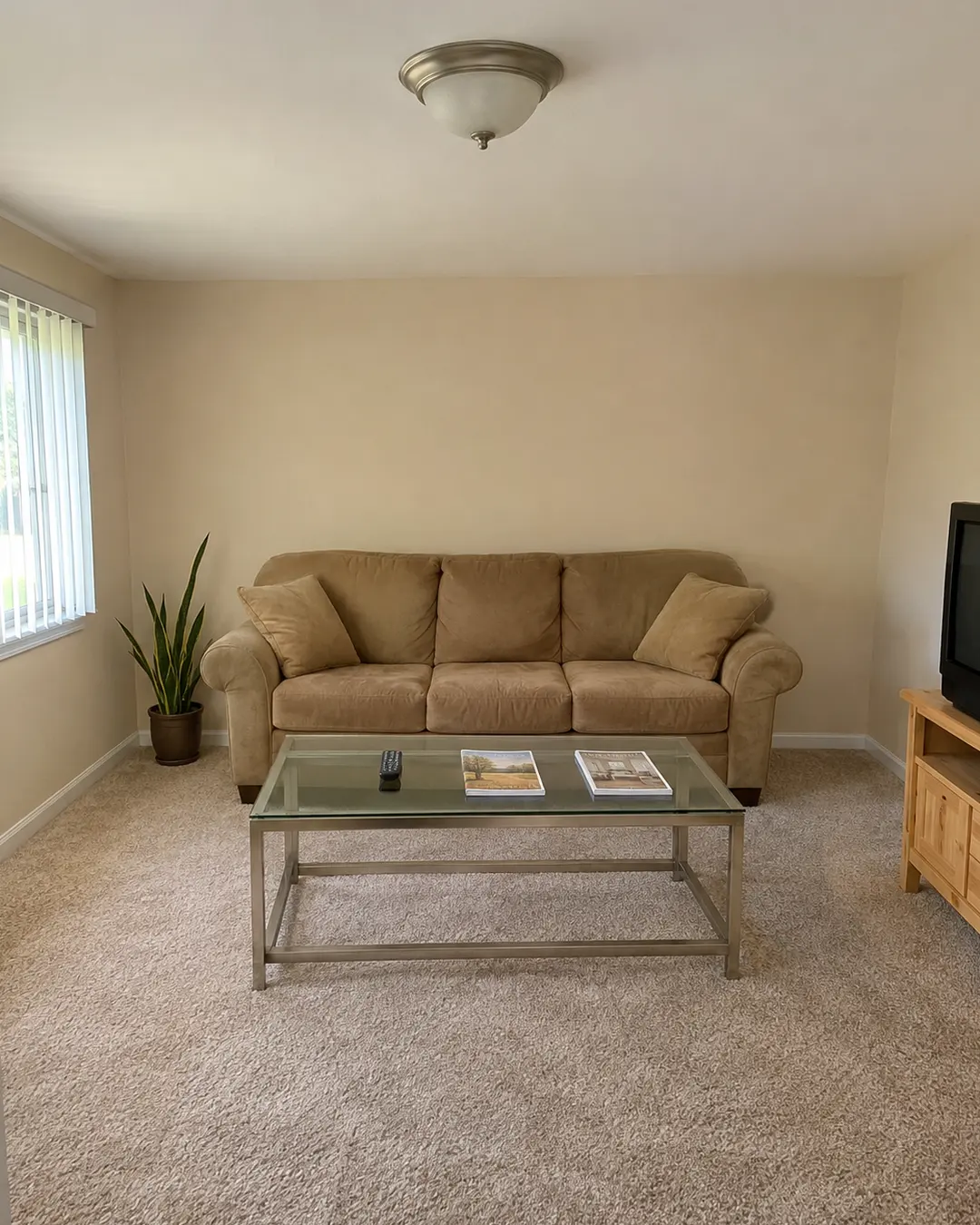
OriginalYour photo, exactly as you took it
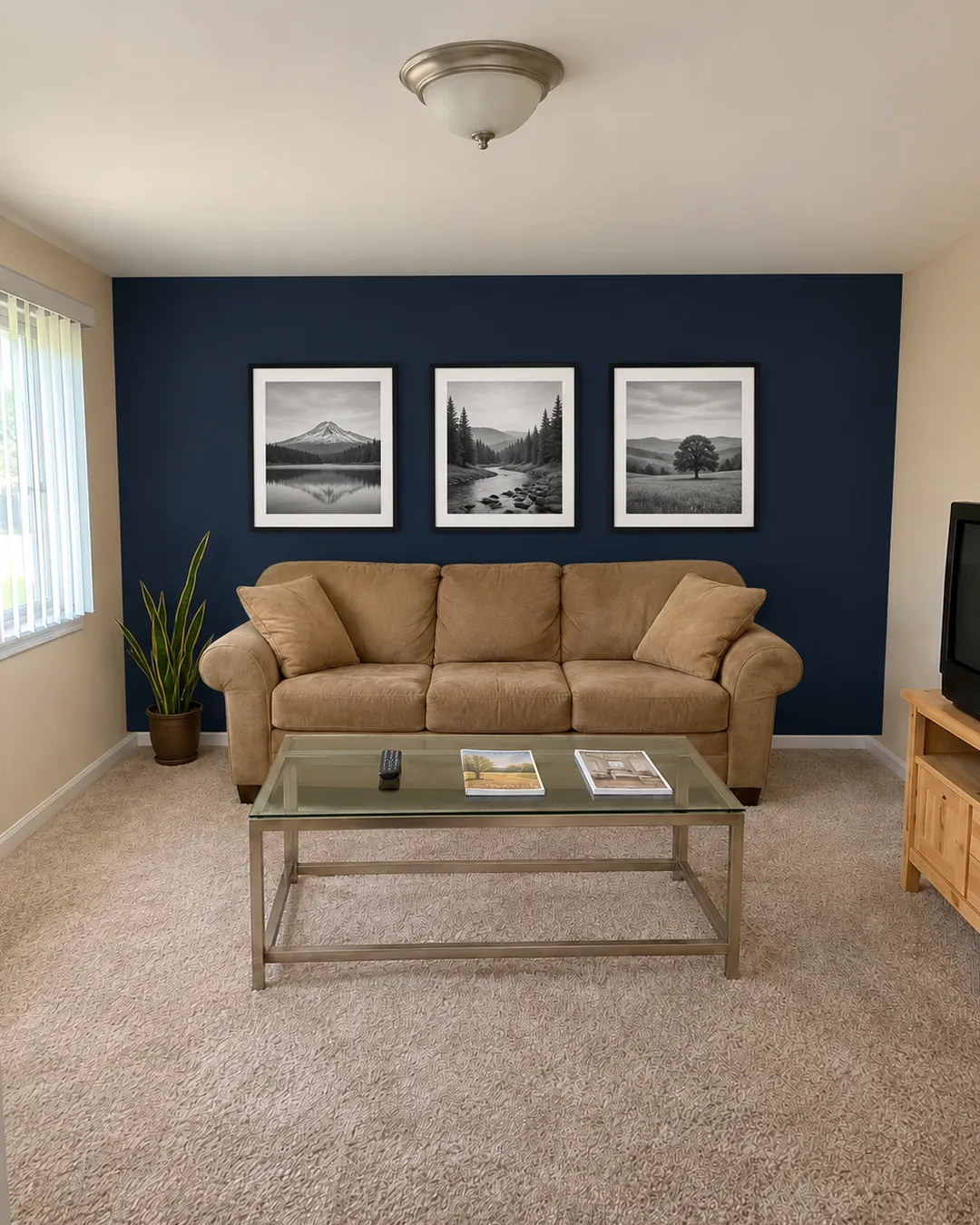
v1Paint the wall behind the sofa deep navy and hang three black and white photos above it. Keep everything else.
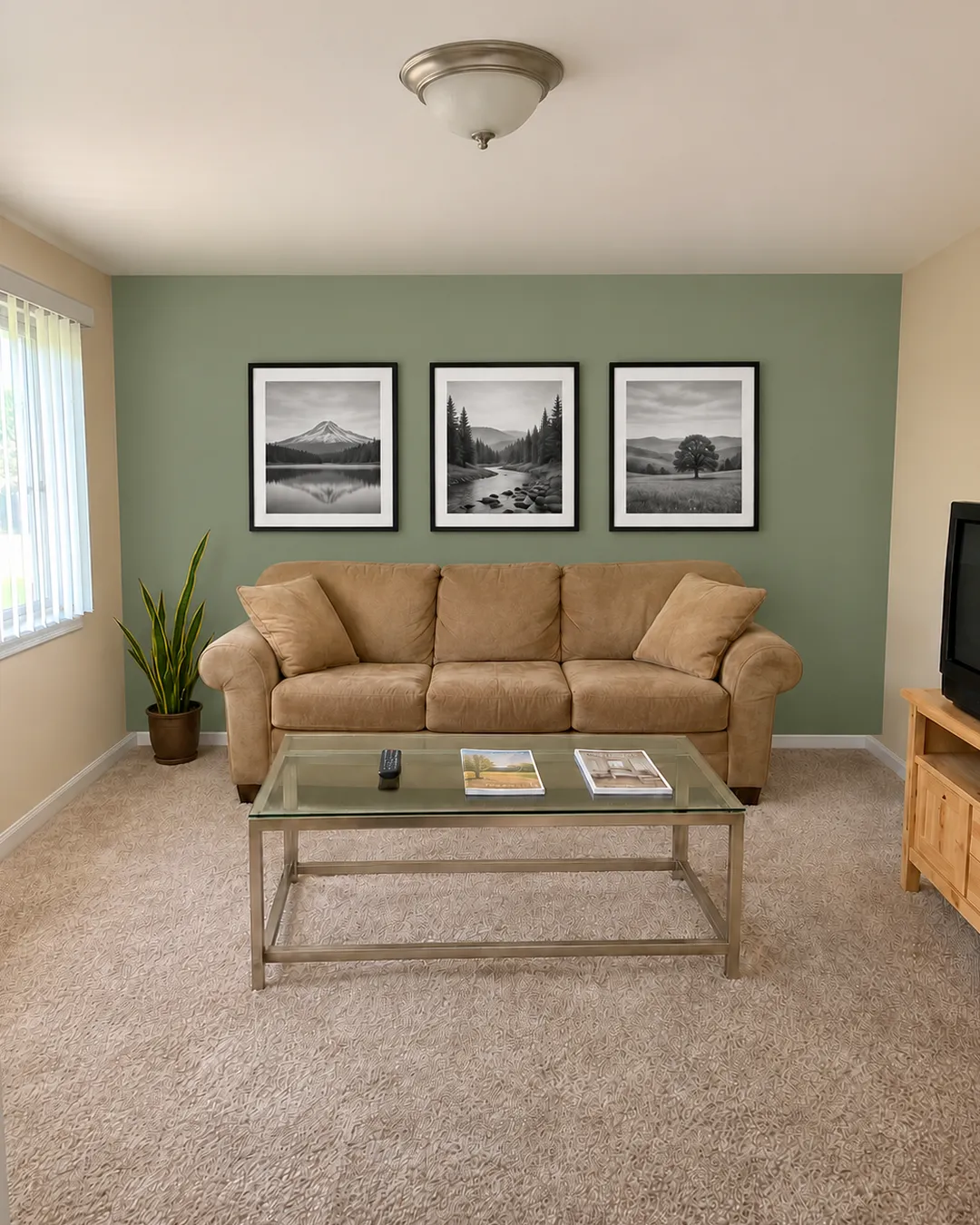
v2Too dark. Try a dusty sage instead.
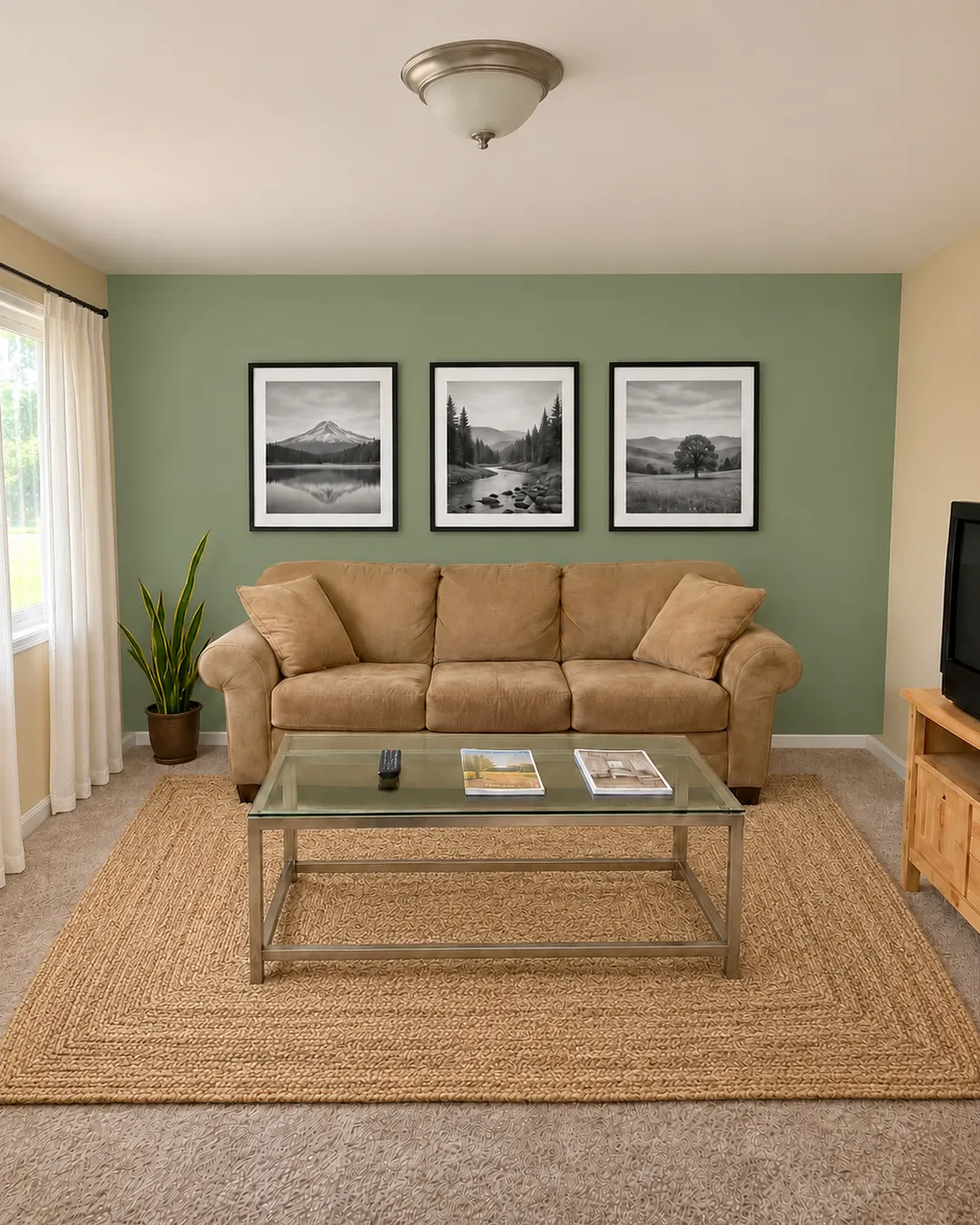
v3Cambia las persianas por cortinas de lino blanco y pon una alfombra de yute bajo la mesa.
Three requests, one room
This is how a Freeform Prompt project reads in Idori. The first request names a wall, a color, and what to hang on it. The second is four words, and Idori knows it is about the wall. The third is in Spanish, because the person typing it thinks in Spanish. Scroll inside the frame to move through the versions.
Scroll inside the frame
Why Freeform Prompt exists
A menu can only offer what someone thought of in advance. Your room is not in anyone's menu. It has the sofa you are keeping, the wall you have hated for two years, and the corner where nothing has ever fit. The fastest way to say what you want for a room like that is the way you would say it to a friend standing in the doorway: "that wall, darker, and something above the sofa".
That is the whole idea of Freeform Prompt. You are not asked to learn prompt keywords, pick from a list, or write in English. You say the change, and Idori does the rendering work on your photo. It follows from what we believe in AI shouldn't design for you: the decisions are yours, and the tool's job is to show you each one on your real room quickly enough that you can make the next. And because a room is a project, not a prompt, your sentence is never a one-off. It becomes a saved version in a history you can walk back through.
How to use AI to design a room with Freeform Prompt
1. Open your room
Take a photo of the room, or open one from your library, or reopen any project you already started. Freeform Prompt always works on your photo. It does not generate a room from nothing.
2. Describe the change
Tap the prompt box, the field that says "Describe your changes...", and type. Say what to change, what it should become, and what must stay. A prompt can be as short as "make it brighter" and as long as 2,000 characters.
3. Send
Idori applies the request to your photo and saves the result as the next version in the project. Your words sit above the image, so weeks later you can still see exactly what you asked for. The room before is one swipe back in Version History.
4. Follow up
Type the next thing. It can be a new change, or a few words about the last one: "too dark", "warmer", "not the rug, the curtains". Each new request is applied to the latest version, so the project reads as one line of decisions.
What you can ask for
Anything you can see in the photo, and anything you can imagine in it. Idori matches the size of the edit to the size of the request: ask for a color and only that color changes, ask for a whole new style and the whole room is restyled. These are examples of how people brief Idori, not scripts. The decisions are yours.
| You ask for | An example | What Idori changes |
|---|---|---|
| A color or paint change | "Paint the cabinets sage green" | Only that surface. Its texture, the light, and everything else stay. |
| Swapping or removing one thing | "Replace the glass table with a round oak one" | Only that object, with whatever was behind it filled in believably. |
| A new material | "Wide oak plank flooring instead of the carpet" | Only that surface, following the room's real shape. |
| A tidy-up | "Clear the counters and declutter the shelves" | The clutter. Furniture, layout, and finishes stay the same. |
| A new layout | "Rearrange the furniture so the sofa faces the window, keep all my pieces" | Where things sit, with the same pieces. |
| A whole new look | "Warm Scandinavian, lots of light wood, keep my sofa" | Furnishings, textiles, decor, finishes, and palette. Walls, windows, and camera stay. |
| Furnishing an empty room | "Furnish this as a home office for two" | Adds furniture scaled to the room you photographed. |
It works outdoors as well. "Turn this lawn into a gravel patio with a fire pit" or "paint the siding dark green with white trim" are the same kind of request on a photo of a backyard or a house exterior.
Say what stays
The most useful words in a prompt are often the ones about what should not change. Idori treats a keep instruction as a rule: "keep my sofa", "keep all my furniture", "the walls stay white". Whatever you name is carried through the edit, and everything you did not mention is left alone by default, because Idori reads your photo as the ground truth and edits it instead of drawing a new room.
A keep instruction also stands. If you said "keep the furniture" in your first request, it still applies to your fourth, until you say otherwise. And some things are never touched unless you ask: people and pets in the photo, and the view outside your windows.
It reads your follow-ups
The second request in a project is rarely a full sentence. It is a reaction: too grey, too much, not that one. Idori reads each new request together with the project so far, your original photo, what you asked earlier, and what came back, so a reaction is understood as one.
| You type | How Idori reads it |
|---|---|
| "Too dark" or "warmer" | Adjust the last edit, and leave the rest of the room alone. |
| "Put the wall back" or "undo the rug" | Make that element look the way it does in your original photo. |
| "Another idea" or "try again" | A visibly different take on the same element, not the same one again. |
| "You changed too much" | Restore what you did not ask to change, then apply only the request. |
| "Actually, make the wall white" | The newest request wins over an earlier one. |
If you want the same request run again without typing anything, tap Retry on the latest version. The new attempt takes its place, so a miss does not clutter the history.
In your own language
You should not have to translate your taste into English first. Write in the language you think in: "Convierte esta sala en un estilo costero luminoso", "畳と低い家具で、和室みたいに落ち着かせて", "حوّل هذه الحديقة إلى جلسة مغربية دافئة". Idori reads the intent and applies it to your photo. You can switch languages inside one project, as the example above does, and the follow-ups still connect.
A worked example: one living room, three requests
The project at the top of this page starts from a plain living room: a tan sofa against a beige wall, a glass coffee table, vertical blinds on the window at the left, beige carpet.
Request one is specific: "Paint the wall behind the sofa deep navy and hang three black and white photos above it. Keep everything else." One wall turns navy. Three frames arrive above the sofa. The side walls stay beige, and the sofa, the table, the plant, and the blinds are exactly where they were.
Request two is a reaction: "Too dark. Try a dusty sage instead." It does not say which thing is too dark, and it does not need to. The wall becomes sage, and the three photos stay on it, because nobody asked for them to move.
Request three is in Spanish: "Cambia las persianas por cortinas de lino blanco y pon una alfombra de yute bajo la mesa." The blinds become white linen curtains and a jute rug lands under the table. The sage wall and the frames carry through.
Before
After
Freeform Prompt with Styles, Style Match, and Spot Edit
The prompt box is the center of Idori, and every other feature meets it there. Pick one of the 40+ Styles and add a sentence to steer it: "Japandi, but keep my sofa". Attach a photo you love for Style Match and add "only the colors and the rug". When your words and the picture disagree, your words win.
When the change belongs to one exact spot, add Spot Edit pins and mention them by number in your prompt: "make @1 match the wood at @2". The pins say where, your words say what, and the rest of the image stays untouched. And inside AI Ideas, the same habit applies: you can state your goal in your own words and get five directions with a plan for each.
Freeform Prompt, AI Ideas, a style, or Style Match: which one to use
Use a Freeform Prompt when you can describe what you want, even roughly. Use AI Ideas when you know the goal but not the move, "make it cozier", and want to see five ways to get there. Use one of the Styles when you know the name of the look. Use Style Match when a picture says it better than words. They stack: start from a style, then type the one thing it got wrong.
What Freeform Prompt does not do
It edits a photo. It does not start from nothing. Every request needs a photo of a real space to work on.
One request, one new version. Each send produces a single result. For several directions to choose between, use AI Ideas, or Branch and try a second line.
It works on the latest version. Earlier versions are read-only. To continue from an older one, Branch from it.
A Spot Edit reads its pins, not the conversation. When you send pins, Idori follows the pins and the words you sent with them. Follow-up shorthand like "too dark" belongs to prompts without pins.
It will not move the camera. The result is the same view of the same room. For another angle, take another photo.
It shows, it does not measure. The result is a realistic picture of your room after the change, not a floor plan or a shopping list. Measure before you buy.
Getting the most out of it
- Name things the way you would point at them. "The wall behind the sofa" beats "the accent wall". Idori has the photo, so position words work.
- Give a color, a material, or a mood. "Dusty sage", "white linen", "warmer and calmer" all give Idori something to aim at.
- End with what stays. "Keep my sofa and the floor" is the fastest way to a result you could actually build.
- One or two changes per request. Small steps are easier to judge, and each one is its own version to go back to.
- React, do not rewrite. When a result is close, say what is off in a few words instead of typing the whole request again.
- Check it with Compare. Drag Compare across the result to see exactly what your sentence changed.
Say it, and see it on your own room
Take a photo of your room and type the first thing you would change. Idori is on iPhone and iPad.
Download IdoriQuestions people ask
Start from a photo of the real room. In Idori, take or open the photo, type what you want in the prompt box, for example "paint the wall behind the sofa navy and hang three framed photos above it, keep everything else", and send. Idori edits your photo instead of inventing a new room, saves the result as a new version, and lets you keep going with short follow-ups until it is right. If you do not know what to ask for yet, AI Ideas, Styles, and Style Match give you a direction first.
Say three things: what to change, what you want it to become, and what must stay. Name the thing the way you would point at it ("the wall behind the sofa", "the vertical blinds"), give a color, a material, or a mood, and end with what stays ("keep my sofa and the floor"). One or two sentences is enough. You do not need special keywords, camera terms, or a long description of the room, because Idori already has the photo.
Yes. Freeform Prompt accepts requests in any language, and you can switch languages inside one project. There is nothing to translate into English first.
Yes. A keep instruction is treated as a rule, not a suggestion. Write "keep my sofa", "keep all my furniture", or "the walls stay white", and those things are carried through the edit. A keep instruction also stands for the follow-ups in the same project until you lift it.
Tell it, in a few words. Idori reads a new request together with the project so far, so "too dark", "not the rug, the curtains", "put the wall back the way it was", or "another idea" are understood as comments on the last edit. You can also tap Retry to run the same request again, or swipe back, because every earlier version is kept in Version History.
Yes. Type something like "rearrange the furniture so the sofa faces the window, keep all my pieces" and Idori shows the same room with the same furniture in a new layout. If you would rather see several layouts to choose from, use AI Ideas with the Rearrange my furniture goal.
A general chatbot can edit a photo from a sentence. What it does not give you is the project around the sentence. In Idori every request becomes a saved version of the same room, you can drag Compare between any two of them, Branch from an earlier one, pin one exact spot with Spot Edit, and start from 40+ Styles or a photo you love with Style Match. Idori is also instructed to treat your photo as ground truth: same room, same camera, only the requested change.
A prompt can be up to 2,000 characters. In practice one or two sentences per request works best, and a second request is better than one very long one.
Yes. Freeform Prompt is part of the Free plan in Idori on iPhone and iPad, on a weekly allowance. Idori Pro adds AI Ideas, a larger allowance, faster processing, and priority.