AI Ideas: Say What You Want for Your Room, Get Five Ways to Do It
 The Idori team
·
·
9 min read
AI Ideas is how you get design ideas for your actual room from a photo. Tell Idori what you want, make it cozier, make it feel bigger, rearrange the furniture you already have, add a workspace, or anything in your own words, and it reads the room in your photo and gives you five different ways to get there. It does not just show you a prettier picture, it tells you what to do: each direction says why it works in this room, lists exactly what to add, move, replace, paint, and keep, and tells you whether it is a quick win, a weekend, or a project. Tap the one that makes sense and see it on your own photo. If you are not sure what you want yet, tap Surprise me and Idori suggests five directions on its own.
- AI Ideas, in one sentence
- A design brainstorm built around your goal: you say what you want for the room, Idori reads the photo and returns five genuinely different directions, each with why it works here, a concrete plan, and an effort level, and one tap shows any of them on your room.
- Intent, in one sentence
- The first question AI Ideas asks, "What do you want to do?": pick a goal, type your own, or pin what has to stay (your furniture, your wall colors), and every direction is built to serve exactly that.
What do you want to do?
Why it works
Cozy comes from soft light at eye level and things you want to touch. You keep the sofa and the layout, so it feels like your room, only warmer.
The plan
- Adda chunky cream wool rug under the coffee table
- Replacethe vertical blinds with floor-length linen curtains
- Adda brass floor lamp with a warm linen shade
- Addtextured pillows and a knit throw on the sofa
- Keepyour sofa, coffee table and layout
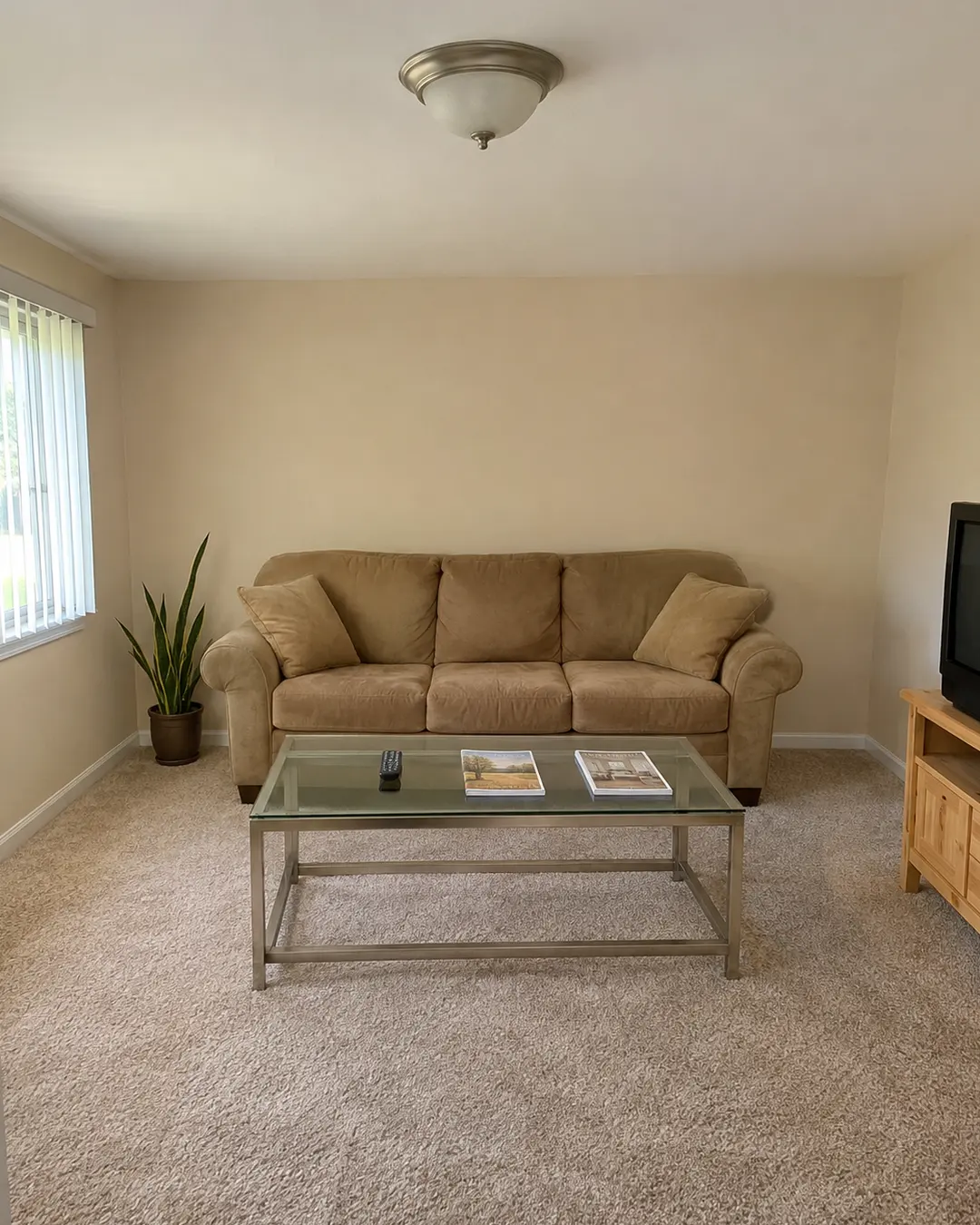
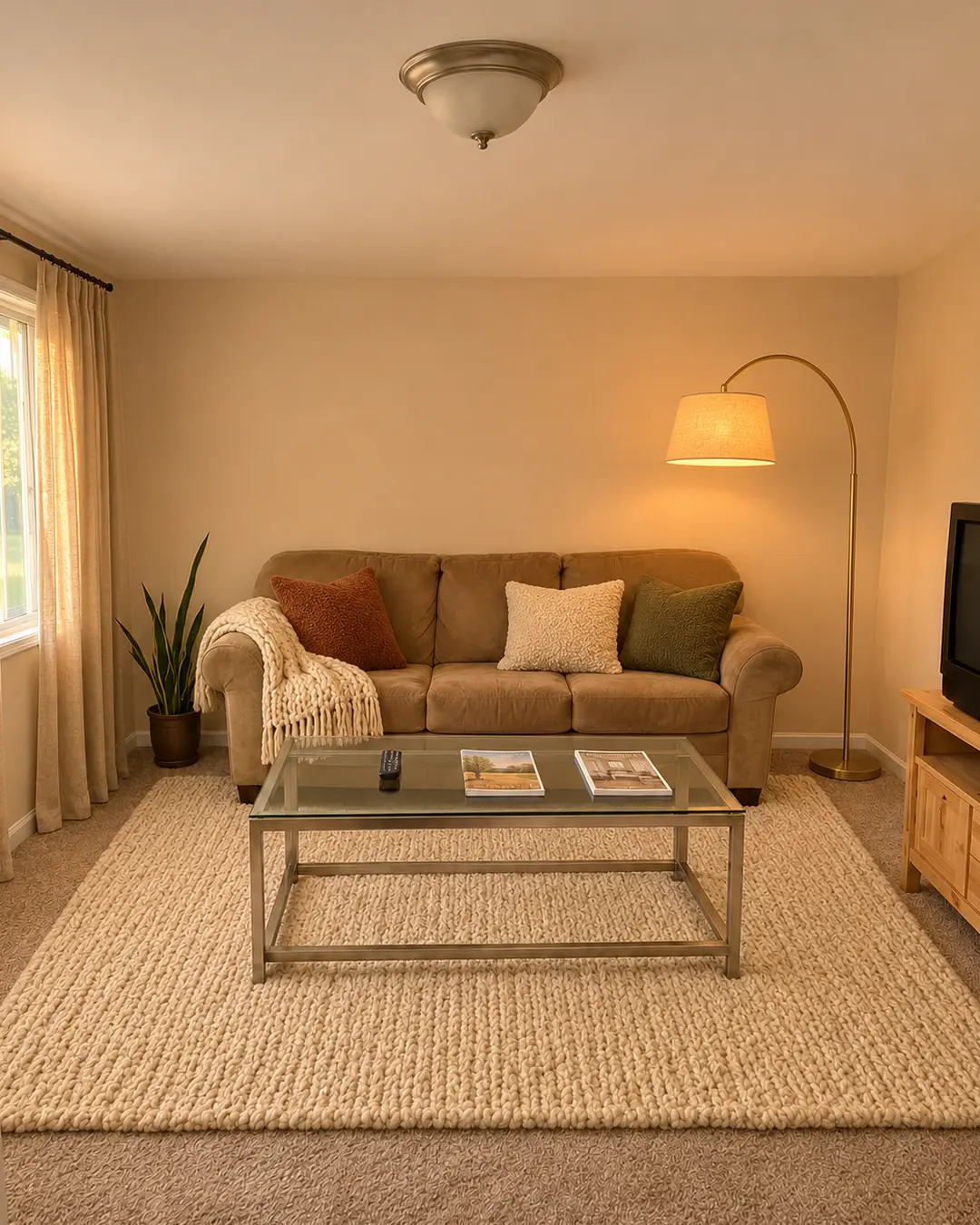 Before
After
Why AI Ideas starts with what you want
Most AI design apps answer a question nobody asked. You upload a photo and get a gallery of finished rooms in fashionable styles, none of which knows that you rent, that the sofa is two years old, or that the only thing you wanted was a place to put a desk. A good designer starts the other way around. The first question is not "what style do you like?" It is "what do you want this room to do for you?"
That is the question AI Ideas now opens with. It follows from what we believe about AI in design, written up in AI shouldn't design for you: the point is better decisions, not fewer of them. Ideas that ignore your goal are noise you have to filter. Ideas built around your goal are options you can actually choose between, and a plan you can actually follow. And because a room is a project, not a prompt, the direction you pick stays attached to the result, so you can come back to its plan when you are standing in the store.
How to get AI design ideas for your room from a photo
1. Start from a photo, or any version
Take a photo of the room, or open one you already have. AI Ideas works on the original photo and on any version you have made since, so you can ask for ideas on the room as it is today or on the redesign you are halfway through.
2. Say what you want
Open AI Ideas and Idori asks, "What do you want to do?" Tap one of six goals: Rearrange my furniture, Make it feel bigger, Make it cozier, Add a workspace, Refresh the decor, or Remodel it. Or type the goal in your own words, in any language: "a desk for my daughter that doesn't take over her room", "brighter, but the TV can't move", "seat six for dinner". Not sure yet? Tap Surprise me and Idori reads the room and suggests five directions on its own.
3. Pin what has to stay
Two switches sit under the composer: Keep my furniture and Keep wall colors. Turn one on and every direction respects it, no exceptions. Some goals set this for you: Rearrange my furniture and Refresh the decor switch Keep my furniture on, because rearranging is about the pieces you own and a refresh should not mean a new sofa. Anything else you say in your own words, "keep the rug", "no new furniture", "the bed stays on that wall", is treated as a rule too.
4. Read the five directions
Idori comes back with five directions for that one goal. Each has a short title, one sentence on what it does, and an effort badge: Quick win for an afternoon and little money, Weekend for a weekend or a few new pieces, Project for a contractor or a big furniture spend. A bar above the directions repeats what you asked, with a Change button to go back and ask something else.
5. Open why it works and the plan
Tap a direction and it opens. Why it works names the problem it solves in your room, in plain words: the narrow walkway, the light that only comes from the ceiling, the empty corner. The plan lists two to five concrete changes, each marked add, replace, move, remove, paint, or keep, with the exact item and where it goes: "the sofa, to face the window", "a walnut desk under the window", "keep the bed and the mirrored closet".
6. See it on your room
Send, and Idori applies that direction to your photo. You can add your own words before you send, "and make the rug darker", and they ride along with the direction. The result is saved as a new version with the direction attached: tap its label later and the why and the plan open again. Asking the same thing on the same photo brings the same five directions back instantly, so you can go look at a different direction without losing the set.
The six goals, and what you get back
Each goal sets what the five directions are trying to achieve. They are starting points, not a menu: your own words can ask for anything.
| Goal | What stays by default | The kind of directions you get |
|---|---|---|
| Rearrange my furniture | Every piece you own | Five different layouts using only the furniture in the photo, each saying exactly which piece goes where. Nothing new is added unless you ask. |
| Make it feel bigger | Nothing, unless you pin it | Different strategies for the same goal: a lighter palette, a layout that opens the walkway, furniture that does two jobs, decluttering and storage, mirrors and lighting. |
| Make it cozier | Nothing, unless you pin it | Warm light at eye level, layered textiles and rugs, a warmer wall color, a reading corner, softer window treatments. |
| Add a workspace | Nothing, unless you pin it | Places a desk could really go in this room: a floating desk under the window, a slim console at the foot of the bed, half a closet turned into a workstation. |
| Refresh the decor | Your main furniture | Decor, color, and textiles only: art, cushions, curtains, lamps, rugs, paint. A new look without a new sofa. |
| Remodel it | Nothing, unless you pin it | Bolder changes to finishes, fixtures, and furniture, the directions you would take to a contractor. |
A worked example: one living room, two different asks
The clearest way to see what the goal changes is to ask two different things about the same photo. Here is one plain living room: a tan sofa against a bare beige wall, a glass coffee table, vertical blinds, a TV on a pine stand.
Ask one: Make it cozier. The direction picked was Layer warm light and texture, rated Weekend. Its plan: add a chunky cream wool rug under the coffee table, replace the blinds with floor-length linen curtains, add a brass floor lamp with a warm linen shade, add textured pillows and a knit throw, and keep the sofa, the coffee table, and the layout.
Ask two: Make it feel bigger, with Keep my furniture on. Now every direction has to work with the same sofa, table, and TV stand. The one picked here was Light walls, high curtains, one mirror, rated Weekend. Its plan: paint the walls a soft warm white, replace the blinds with sheer white curtains hung just under the ceiling and wider than the window, hang a large round mirror above the sofa to double the window light, clear the coffee table, and keep every piece of furniture where it is.
Before
Cozier
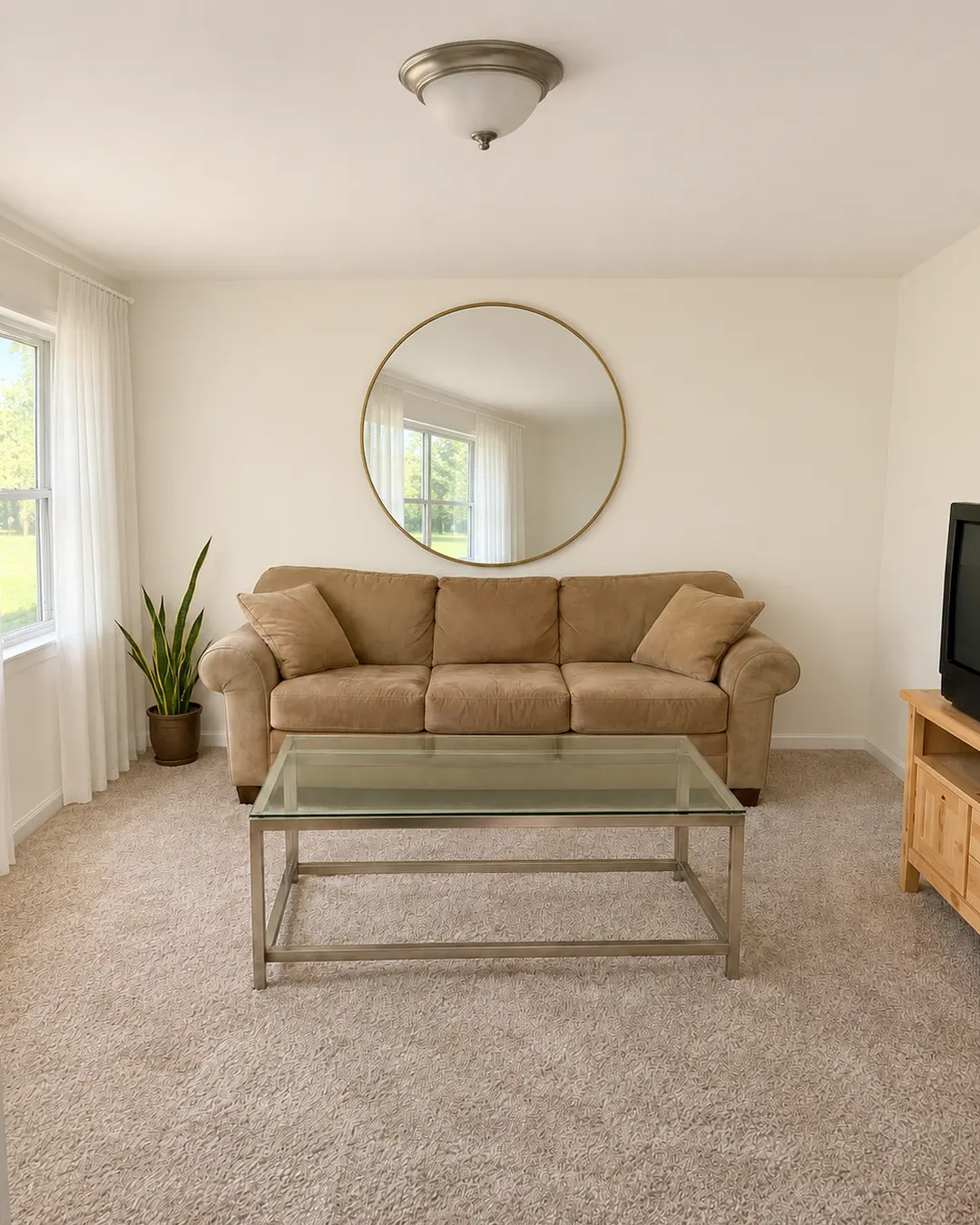 Before
Bigger
Same room, same furniture, two opposite results, because the goals pull in opposite directions. Cozy adds warmth and things to touch, and the room closes in a little on purpose. Bigger takes things away, lifts the eye, and bounces the light around. Neither is a style. Both are answers to a question you asked about your own room.
Five directions, not five versions of one idea
Asking for "make it feel bigger" and getting five shades of white paint would be useless. AI Ideas is built to avoid that. The five directions for one goal are different strategies: if one is about color, the next is about layout, the next about storage, the next about light. There is always at least one quick win, and unless your goal rules it out, at least one bolder direction, so you can see the cheap fix and the big move side by side and decide what the result is worth to you.
Every direction is also grounded in what is in your photo. It talks about "the grey sectional" and "the window on the left wall", not "a sofa" and "natural light". And every direction is something Idori can actually show you on this photo: it does not suggest moving a wall, adding a window, or rerouting plumbing, because a direction you cannot see is a direction you cannot judge.
Ask in your own words
The six goals cover what people ask most, but the field under them takes anything, up to a few sentences, in any language. Idori answers in your language. Some of the questions people bring to it:
- "Make it less cramped so we can walk around." Five layouts that open the walkways and free floor area with the furniture you have.
- "Rearrange it with what I have, I don't want to buy anything." Turn on Keep my furniture, and every direction is a new arrangement of your own pieces, mostly quick wins.
- "A study corner for a college student, small budget." Workspace directions sized for the room, with the effort badge doing the budgeting for you.
- "Make the backyard usable in the afternoon, keep the oak tree." Shade, seating, and paths around what is staying.
- "Boost the curb appeal, keep the brick and the roof." Paint, trim, door, and lighting directions for the facade you have.
The more you say about the goal and the limits, the more useful the five directions are. "Cozier for winter evenings, the TV can't move, under a weekend" gets you a sharper answer than "make it nice".
AI Ideas, a style, Freeform Prompt, or Spot Edit: which one to use
Idori has four ways to change a room, and they answer four different states of mind. AI Ideas is for when you know the goal but not the fix, or when you do not know either and want to be surprised. One of the 40+ Styles is for when you already know the look you want. A Freeform Prompt is for when you know exactly what you want and can say it. Spot Edit is for the end: the direction is right and one or two things are not, so you pin them and change only those.
They also work together. Ask AI Ideas for a direction, apply it, then pin the lamp you did not love with Spot Edit and swap it for the one you found online. Every step is a new version in your Version History, so the room before any idea is one swipe back.
What AI Ideas does not do
It shows, it does not measure. A direction is a realistic picture of your room, not a floor plan. Before you buy a desk or move a sofa into an alcove, measure it.
Five directions per ask. If none of the five fit, change the goal or the wording and ask again. A different ask gets a different set.
Two keep switches. The switches cover your furniture and your wall colors. To keep anything else, the floor, the rug, the bed on its wall, say it in your own words and Idori treats it as a rule.
The plan is not a shopping list. It says "a brass floor lamp with a warm linen shade", not which store sells one. To try an exact product you found, use Spot Edit with its photo.
Effort is a rough signal. Quick win, Weekend, and Project tell you the scale of a direction, not a quote. Prices where you live are yours to check.
It stays inside the photo. Directions change what is visible in the frame. They do not move walls, windows, or plumbing, or redesign the part of the room the camera cannot see.
Getting the most out of it
- Say the goal and the limits. One sentence about what you want and one about what cannot change beats a long description of the room. Idori can see the room.
- Photograph the whole problem. Stand in a corner or a doorway and get the walls, the floor, and the window in frame. AI Ideas can only reason about what the photo shows.
- Read the why before you look at the picture. It is where the design thinking is, and it is often the part that changes your mind.
- Ask on the version you like. AI Ideas works on any version, so get the layout right first, then ask for decor ideas on top of it.
- Check it with Compare, finish with Spot Edit. Drag Compare across the result to see exactly what the direction changed, then pin anything you would do differently.
Ask AI Ideas about your own room
Take a photo, say what you want, and get five ways to do it, each with the reason and the plan. Idori is on iPhone and iPad.
Download IdoriQuestions people ask
Yes. In Idori, take a photo of your room, open AI Ideas, and say what you want, or tap Surprise me. Idori reads the room in the photo and gives you five design directions, each with why it works in that room and a plan of what to add, move, replace, paint, and keep. One tap shows any direction on your own photo.
Yes. Idori's AI Ideas gives you a plan with every direction, not only an image. Each one lists two to five concrete changes, marked add, replace, move, remove, paint, or keep, with the exact item and where it goes, plus why it works in your room and whether it is a quick win, a weekend, or a project. Then one tap shows it on your photo.
Yes. Open AI Ideas in Idori and tap Make it feel bigger. You get five different strategies for your room, such as a lighter palette, a layout that opens the walkways so there is more room to move around, furniture that does two jobs, storage and decluttering, or mirrors and lighting, each with the reason it works and a plan. Turn on Keep my furniture to get only ideas that use what you own.
Yes. In Idori, tap Rearrange my furniture in AI Ideas. Keep my furniture switches on automatically, so all five directions are new layouts of the pieces already in your photo, each saying which piece goes where, and nothing new is added unless you ask. Tap one to see your own furniture in its new places. Step by step: how to rearrange my room from a photo.
Tap Refresh the decor in AI Ideas, or turn on Keep my furniture with any goal. Every direction then keeps your furniture and works with what changes easily: paint, art, cushions, curtains, lamps, and rugs. Each direction is marked Quick win, Weekend, or Project so you can see the scale before you start.
Yes. Every direction built from your goal opens to Why it works, which names the problem it solves in your room, and The plan, a list of two to five concrete changes marked add, replace, move, remove, paint, or keep. The direction stays saved with the result, so you can read the plan again later.
Yes. Under the six goals there is a field for your own words, in any language, up to a few sentences, for example "a desk for my daughter that doesn't take over her room" or "brighter, but the TV can't move". Constraints you write are treated as rules, and Idori answers in your language.
They are the effort badge on each direction. Quick win is an afternoon and little money, like moving furniture, paint, or textiles. Weekend is a weekend of work or a few new pieces. Project means a contractor or a big furniture spend. It is a rough signal of scale, not a price quote.
Yes. AI Ideas works on any photo you bring into Idori. Say what you want in your own words, like "update the kitchen, keep the cabinets", "more curb appeal, keep the brick", or "shade on the patio, keep the oak tree", and the five directions are built for that space and that goal.