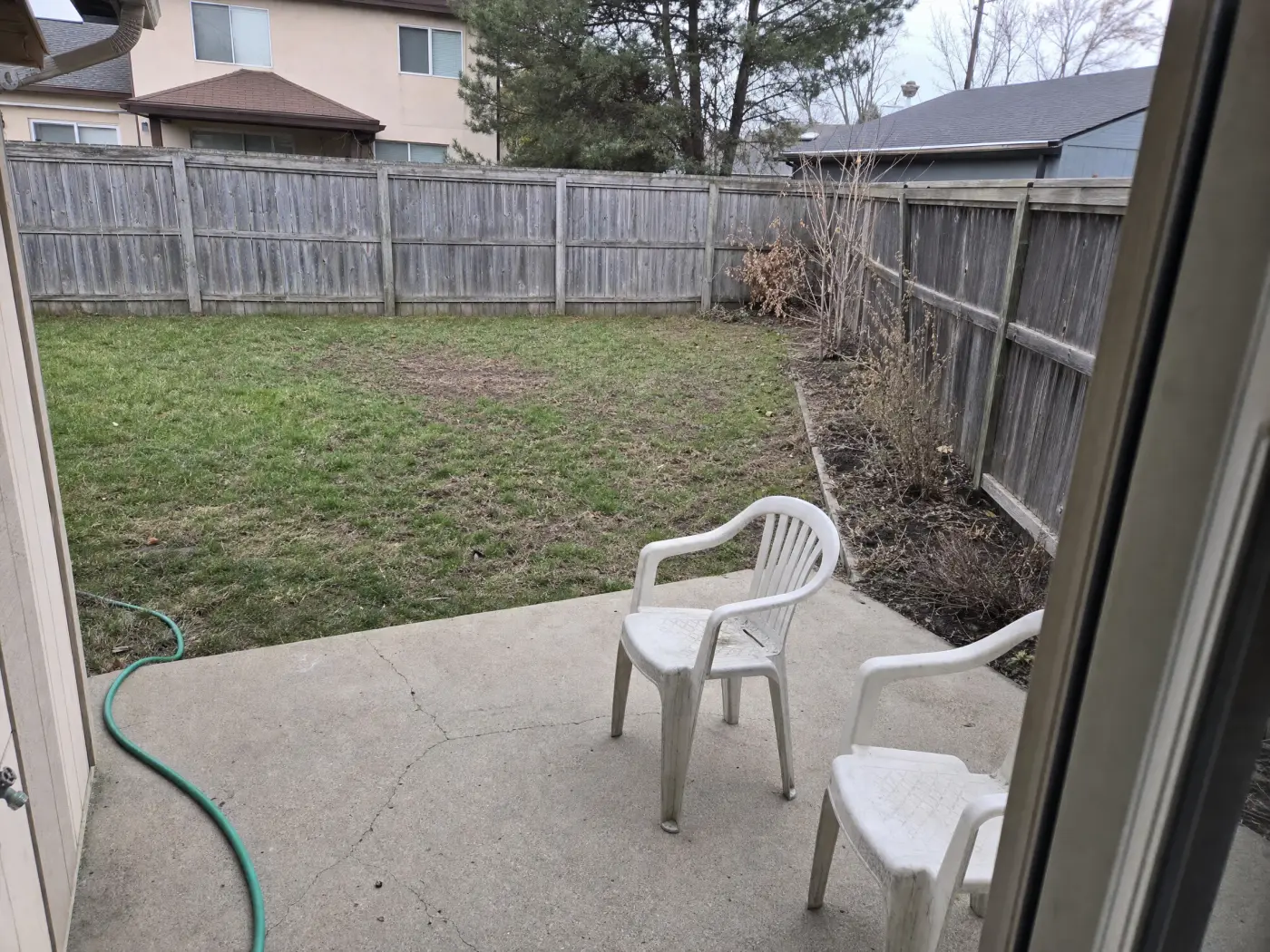
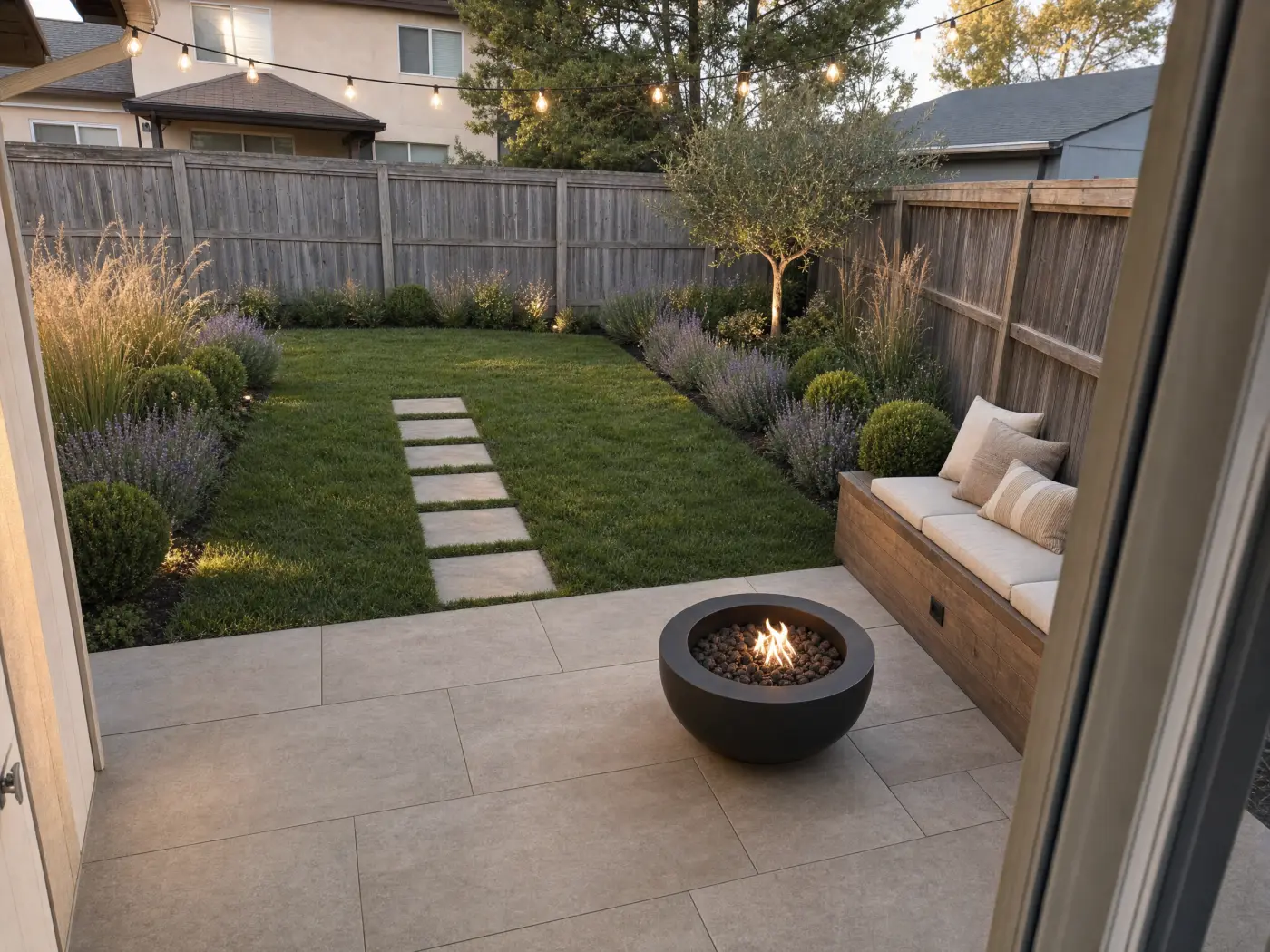
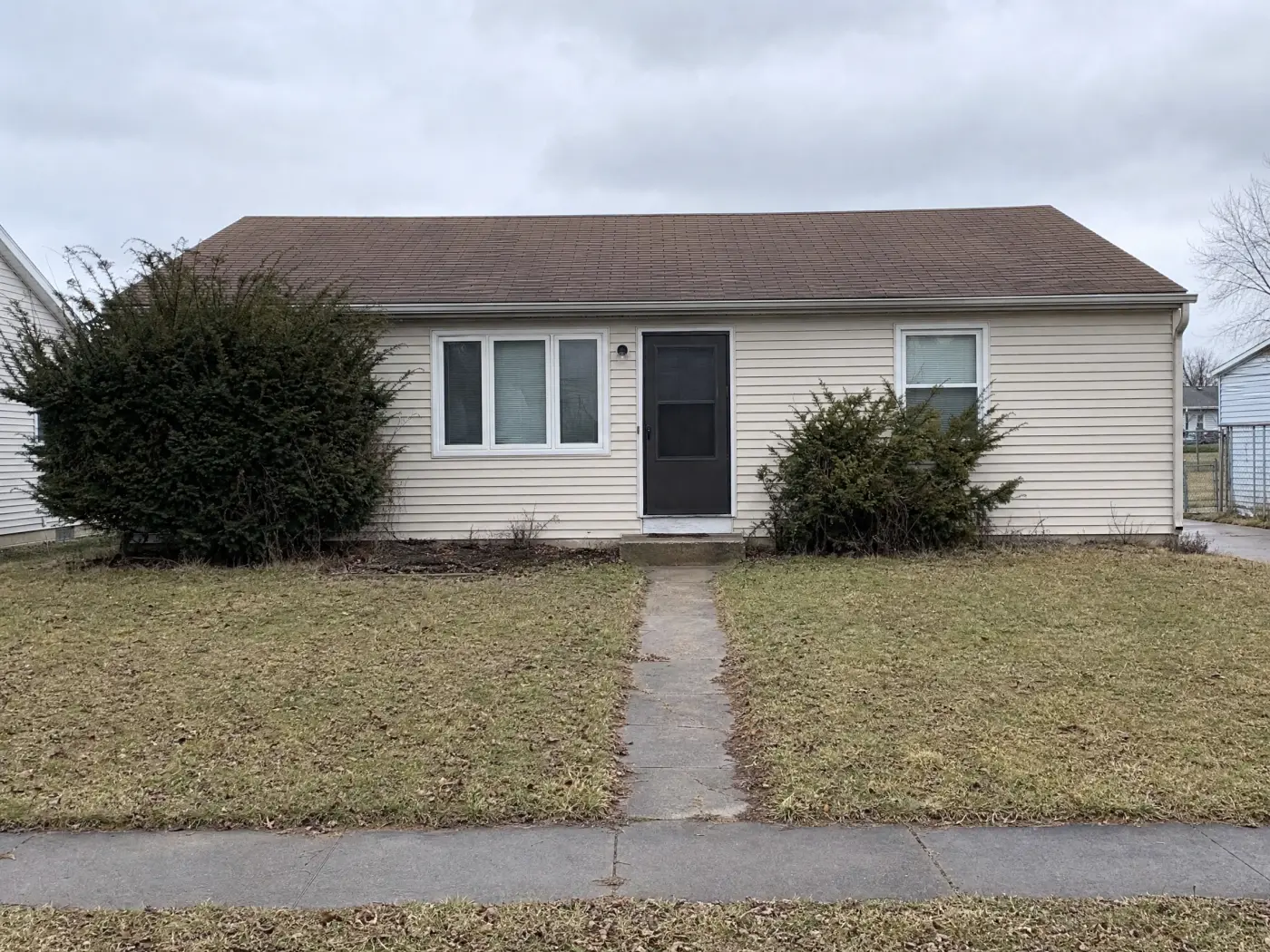
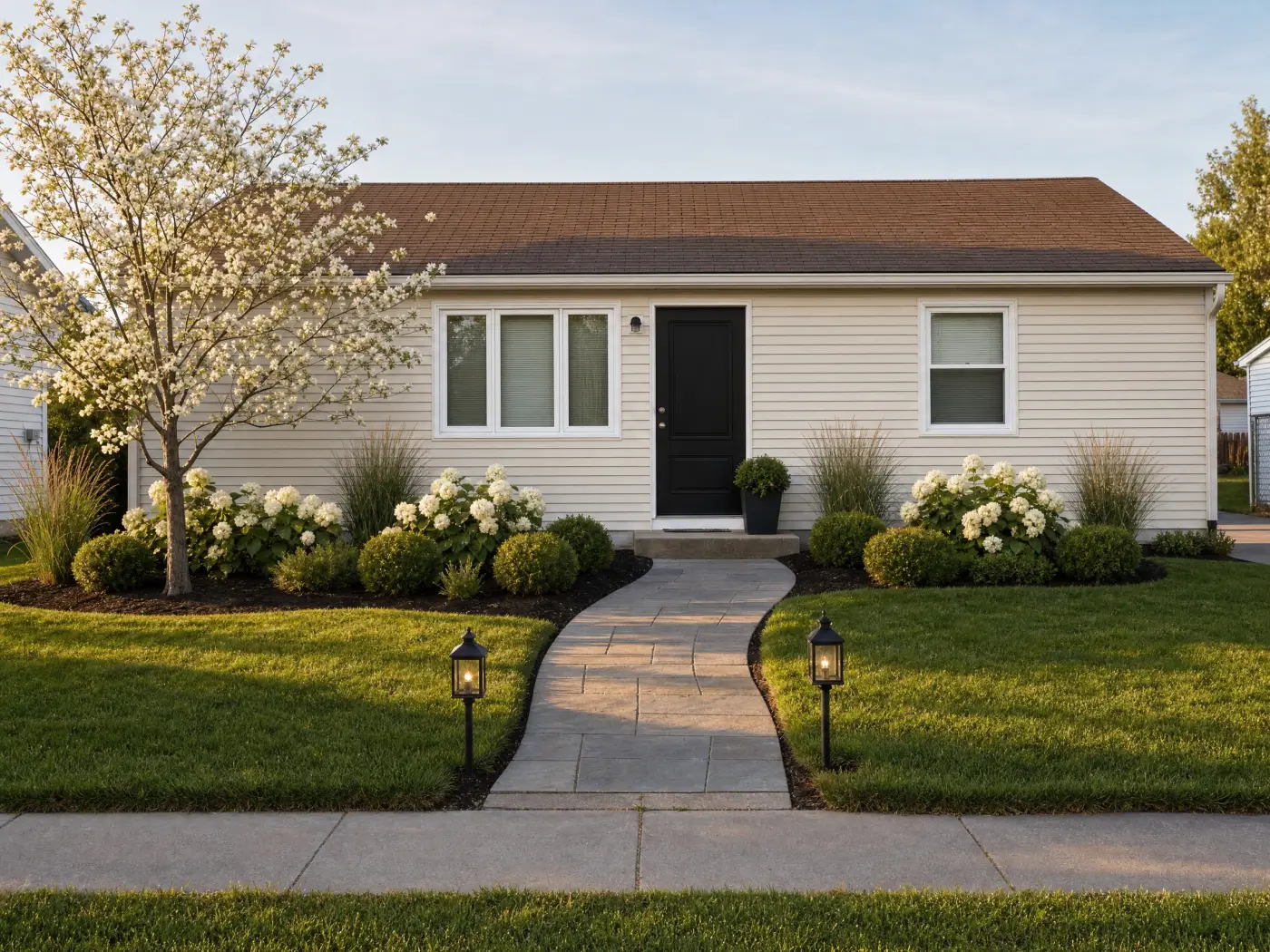
Photograph the backyard, garden, or front of the house, describe the outdoor space you want, and see it on your own property. Same house, same fence, new landscape.
Backyards, gardens, front yards, patios · Free to start · Your photos stay private
BeforeAfter
The flow
One photo in, a landscaped yard out.
No plot plan, no plant catalog, no design software. Just the yard you already have.
1
Photograph the outdoor space
Backyard from the patio door, garden from the path, front yard from the sidewalk. Include the house edge, fence, or hedge so Idori knows where the space ends.
2
Pick a direction
Get AI Ideas if the yard feels wrong and you cannot name the fix, tap any of the 30+ curated styles, Mediterranean, Japandi, Modern Farmhouse, Coastal, Tropical, and Cottagecore among them, or describe the landscaping ideas you have in mind in your own words, in any language.
3
Let the AI landscape it
Idori keeps the house, the fence line, and the camera angle from your photo as anchors while it redesigns the lawn, beds, paths, and patio. Every version starts from your yard, not a catalog render.
4
Compare & decide
Slide before against after, Branch the direction you like to push it further, and take the winner to the nursery or the landscaper.
Everything Idori does, outdoors
The same studio, pointed at your yard.
AI Ideas, Spot Edit, 30+ styles, Freeform Prompt, and a Workspace that keeps every version. Nothing is scaled down for exteriors.
5 directions, read from your yard
Layered curb-appeal bedsBoxwood, hydrangea, and grasses to give the bare foundation depth and hide the crawlspace line.
Curved walkway and one treeA curved paver walk in place of the cracked path, and a flowering dogwood to soften the blank left wall.
Low-water gravel front gardenSwap the thin lawn for gravel, native perennials, and a mulched bed that never needs mowing.
+ 2 more directions, each with its reasoning
AI Ideas
Yard feels wrong, but you can't name the fix?
Most people know their yard is not working long before they know why. AI Ideas reads and analyzes the actual outdoor space in your photo, the blank fence, the bed nobody planted, the patio too small for the table, then proposes five distinct directions to lift it, each with the reasoning: what to change and why it would improve the space. Tap any direction to see it on your yard. It does not decide for you. It shows you the choices, so the decision stays yours and becomes a better one.
Five directions read from your own yard, each with its reasoning
Trained on real work from professional designers
One tap to visualize any direction on your photo
1Lavender and grasses here
3Fresh lawn, stepping-stone path
2Paver patio, same footprint
Spot Edit
Change the bed. Keep the fence, the tree, and the house.
Outdoor photos are full of things you want to keep: the mature tree, the fence you just paid for, the roofline that anchors the view. Most AI tools redraw all of it the moment you ask for a new patio. Spot Edit ends that. Pin up to four spots on your photo and tell Idori what each one should become, attach a reference photo to match a specific paver, planter, or plant, and call out spots like @1 right in your prompt. Everything you did not pin stays exactly as it is.
Replant one bed without touching the rest of the yard
Match a real paver, fence stain, or plant by attaching its photo
Up to 4 precise spots per generation, each with its own instruction
Styles
30+ complete looks, one tap, on your yard.
Every one of Idori's 30+ curated styles is a complete, considered look, and every one of them applies outdoors exactly as it does indoors. Modern styles like Japandi and Organic Modern read as clean pavers, gravel, and sculptural planting. Classic looks like Mediterranean and French Country bring terracotta, clipped hedges, and climbing vines. Bold styles like Tropical, Moroccan, and Maximalist go big on foliage and color. Cozy looks like Modern Farmhouse, Coastal, Rustic, and Cottagecore turn a yard into somewhere you want to sit at dusk. Tap one and see your own backyard in it.
Four families, Modern, Classic, Bold, and Cozy, 30+ styles and growing
Applied to your actual yard, house, and fence, not a stock render
Try five styles in five taps, then Compare them side by side
BeforeAfter
Compare, Branch & Version History
Every yard becomes a project. Every result, a version.
A landscape is a sequence of decisions, not one image, so Idori treats it that way. Each outdoor space becomes a project in one continuous Workspace, and every result you generate is a version you can return to. Compare slides between any two, the gravel garden against the lawn, the paver patio against the deck, on the same photo of your yard. Branch from any version to push a direction further without losing the others, and Version History keeps the whole path, so the idea you rejected in spring is still there in autumn. Landscape inspiration is everywhere and almost none of it was shot on a lot like yours; here, every version starts from your property, your slope, your fence, your light.
Slide between any two versions of your own yard
Branch a direction to explore it without losing the rest
Export any version in full quality for a nursery, landscaper, or contractor
Use AI to design your backyard, your garden, or the whole front of the house.
Outdoor spaces have jobs too: somewhere to eat, somewhere to grow, somewhere that looks right from the street. Start with the job, then let the design follow.
Backyard design
Design the backyard around how you actually use it: a patio big enough for the table, a fire pit corner, a lawn for the kids, or a low-maintenance planted yard with no lawn at all.
Try garden design ideas on your real beds: a perennial border, raised vegetable beds, a gravel garden, or a shaded woodland corner, with paths that make the garden walkable.
Low-water and native planting looks
Raised beds and kitchen gardens
Paths, edging, and one focal tree
Front yard and house exterior
Curb appeal from the sidewalk view: foundation planting, a wider walkway, a flowering tree, and exterior paint and trim colors you can test with a Spot Edit while the rest of the facade stays put. Redesigning the house itself, siding, brick, porch, and door? See AI Exterior Home Design.
Exterior house colors, trim, and the front door
Walkways, driveway edges, and path lights
Entry planting and porch details
Freeform Prompt: examples of how people brief Idori
With a Freeform Prompt you describe the change in your own words and your own language, and Idori reads the intent. Name what stays, what changes, and what the space is for. These are examples, not scripts: the decisions are yours.
“Keep the house, the fence, and the big tree. Redesign this backyard with a large paver patio, built-in bench seating, a fire bowl, and a layered border of grasses and lavender along the fence.”
“Turn this lawn into a low-water garden with gravel paths, native perennials, and a small olive tree. No thirsty planting.”
“Give this front yard curb appeal: a curved walkway, boxwood and hydrangea foundation beds, one flowering tree, and warm path lights. Keep the house exactly as it is.”
“Make this narrow side yard usable: a stepping-stone path, a raised vegetable bed along the wall, and a trellis with climbing jasmine.”
An AI landscape design is a visual concept, not a planting plan. Idori shows how a direction will look on your yard. It does not check plant hardiness for your climate zone, sun and shade hours, drainage, grading, setbacks, or what is buried under the lawn. Before digging or planting, confirm plants with a local nursery, have utility lines located, and bring in a landscaper for grading, drainage, and hardscape. Previewing first means you know what you want before you pay for any of it.
Landscape design with AI, answered
Questions before you start.
Yes. Idori is an AI landscape and garden design app for iPhone and iPad. It starts from a photo of your backyard, garden, or front yard and redesigns that exact outdoor space: apply a curated style, or describe the patio, planting, and lawn you want in your own words, then Compare each version against the original.
Yes. Idori is free to download on iOS and free to start. The Free plan includes Freeform Prompt redesigns and all 30+ curated styles on a weekly credit allowance, with Compare and Version History. Idori Pro opens up AI Ideas, Spot Edit, and watermark-free exports.
Photograph the backyard from the door or patio you use most, so the house edge and the fence are in frame. Then either get AI Ideas, which reads the yard and proposes five directions with the reasoning behind each, or write what you want: keep the tree, add a paver patio, plant the fence line. Idori returns your backyard with the new landscape in seconds.
Yes. Garden design prompts work well because the beds, paths, and edges in your photo stay put. Ask for a perennial border, a gravel garden with native plants, raised vegetable beds, or a shaded corner with ferns, and Idori plants that scheme into your actual garden.
Yes. Photograph the house from the sidewalk and ask for curb appeal: a new walkway, foundation planting, a flowering tree, path lighting. For the house itself, pin the siding, trim, or front door with Spot Edit to test exterior paint colors while everything else in the photo stays exactly as it is.
Yes. Name what stays in the prompt, for example keep the deck and the maple, and Idori designs around it. For a single change, use Spot Edit: pin the lawn or one bed, describe the new planting, and only that pinned spot changes.
Not to explore. One photo is enough to try landscaping ideas. Before you plant or build, you do need the real numbers: lot lines and setbacks, sun hours, soil and drainage, plant hardiness for your zone, and utility locations. Idori shows the look; a nursery and a landscaper confirm the plan.