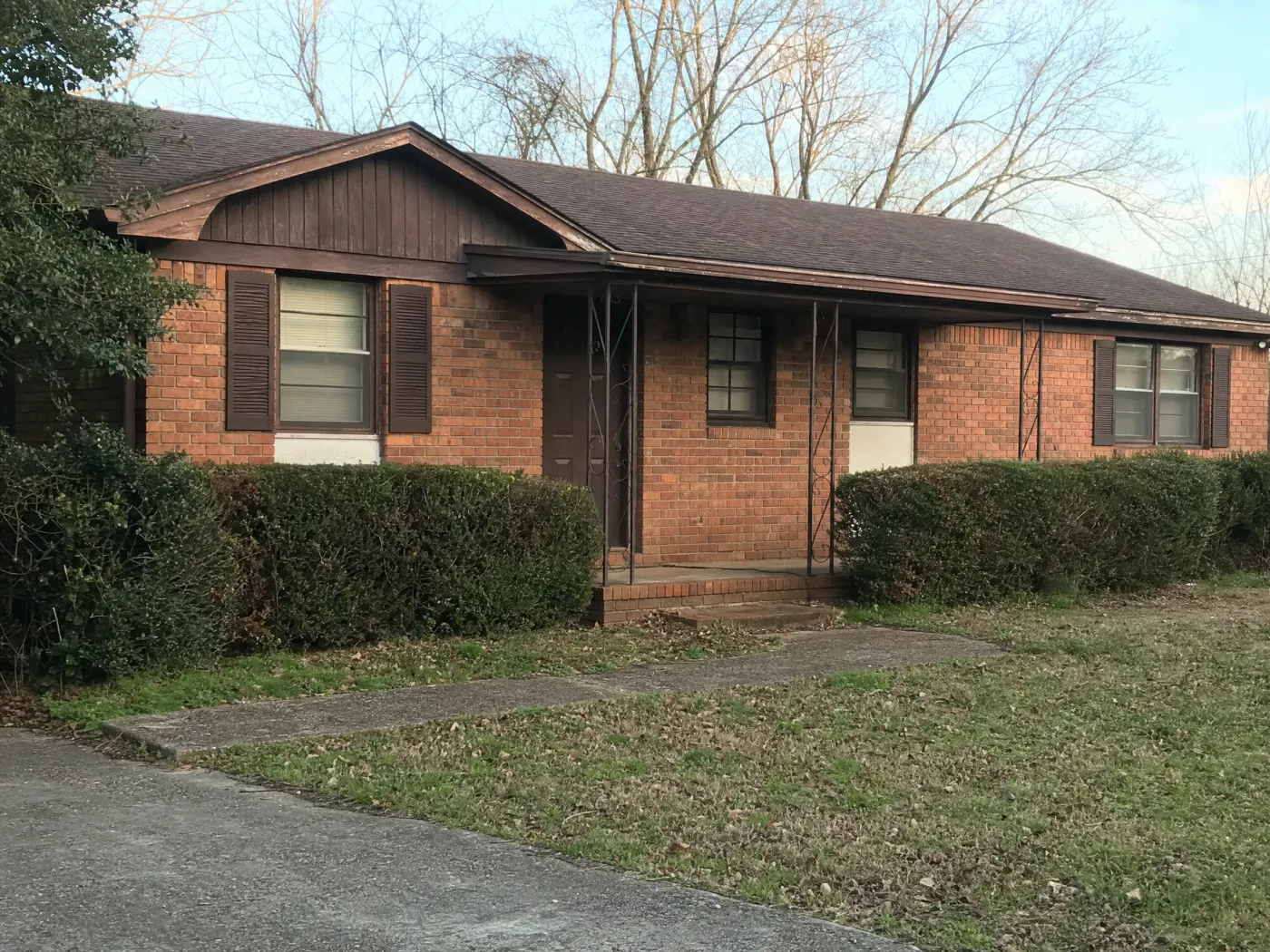
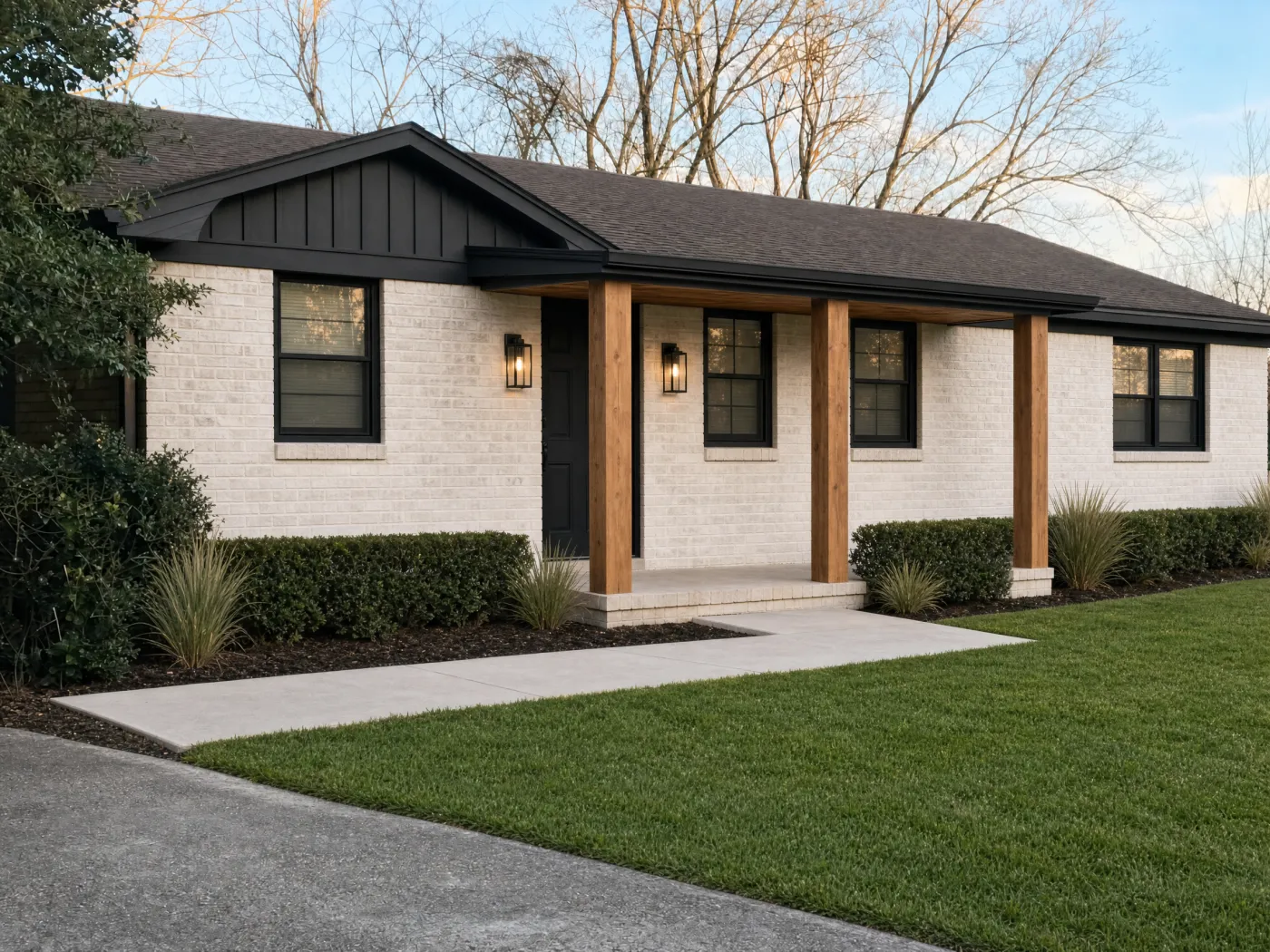
Take one photo from across the street and see your own house in a new paint color, with limewashed brick, a new front door, and a porch that finally looks like one. Keep the roof, the windows, and anything else you love.
Paint, siding, brick, doors, porches · Free to start · Your photos stay private
BeforeAfter
The flow
From the curb to a house you are proud to pull up to.
An exterior is the most expensive thing to get wrong and the only part of your home the whole street sees. Idori lets you get it wrong for free, as many times as you like, on your own house.
1
Photograph it from the street
Cross the road and fit the whole front in one frame, roof to lawn, on a bright overcast day. That is the view your neighbors, your guests, and every future buyer get, so it is the view to design.
2
Get AI Ideas, or name the color
Get AI Ideas and see five directions read from your house, tap one of the 30+ curated styles, or say it plainly: dark green siding, white trim, a wood front door, lose the shutters.
3
See it on your own facade
Idori holds the roofline, the windows, the porch footprint, and the camera angle as anchors and changes the surfaces you asked about. Your house stays your house, in a new color, a new material, or a new style.
4
Compare, then buy the samples
Slide colors against each other on the same photo, Branch a paint-only version from the full makeover, and walk into the paint store with two finalists instead of a fan deck of forty.
Every Idori feature, on the outside of your house
A design studio for the side of your home the street sees.
AI Ideas, Spot Edit, 30+ styles, Freeform Prompt, and a Workspace that remembers every version. The whole app, pointed at your facade.
5 directions, read from your house
Limewash the brick, darken the trimThe orange brick and brown trim are the same temperature, so the house reads flat. A soft white brick with black trim gives it edges again.
Give the porch some weightThin metal posts make the entry disappear. Chunky timber posts tell a visitor where the door is from the street.
Lose the shutters, keep the brick redNot ready to paint brick? Removing the fake shutters and cutting the boxwoods back does half the work for almost nothing.
+ 2 more directions, each with its reasoning
AI Ideas
You know the house looks tired. AI Ideas tells you why.
Most dated exteriors are not one bad choice, they are three small ones that cancel each other out: a brick and a trim of the same warm brown, shutters that could never close, an entry so thin it vanishes from the street. You feel it every time you pull into the driveway, and you still cannot name it. AI Ideas reads the actual house in your photo, the roof color you are not replacing, the brick, the windows, the light, and proposes five distinct directions, each with its reasoning: what to change, and what it fixes. Some are a weekend and a gallon of paint. Some are a full makeover. Tap one to see it on your house. It does not pick for you. It gives you better choices, and the decision stays yours.
Five directions read from your own facade, each with its reasoning
Works with what you are keeping: the roof, the brick, the stone
One tap to see any direction on your photo
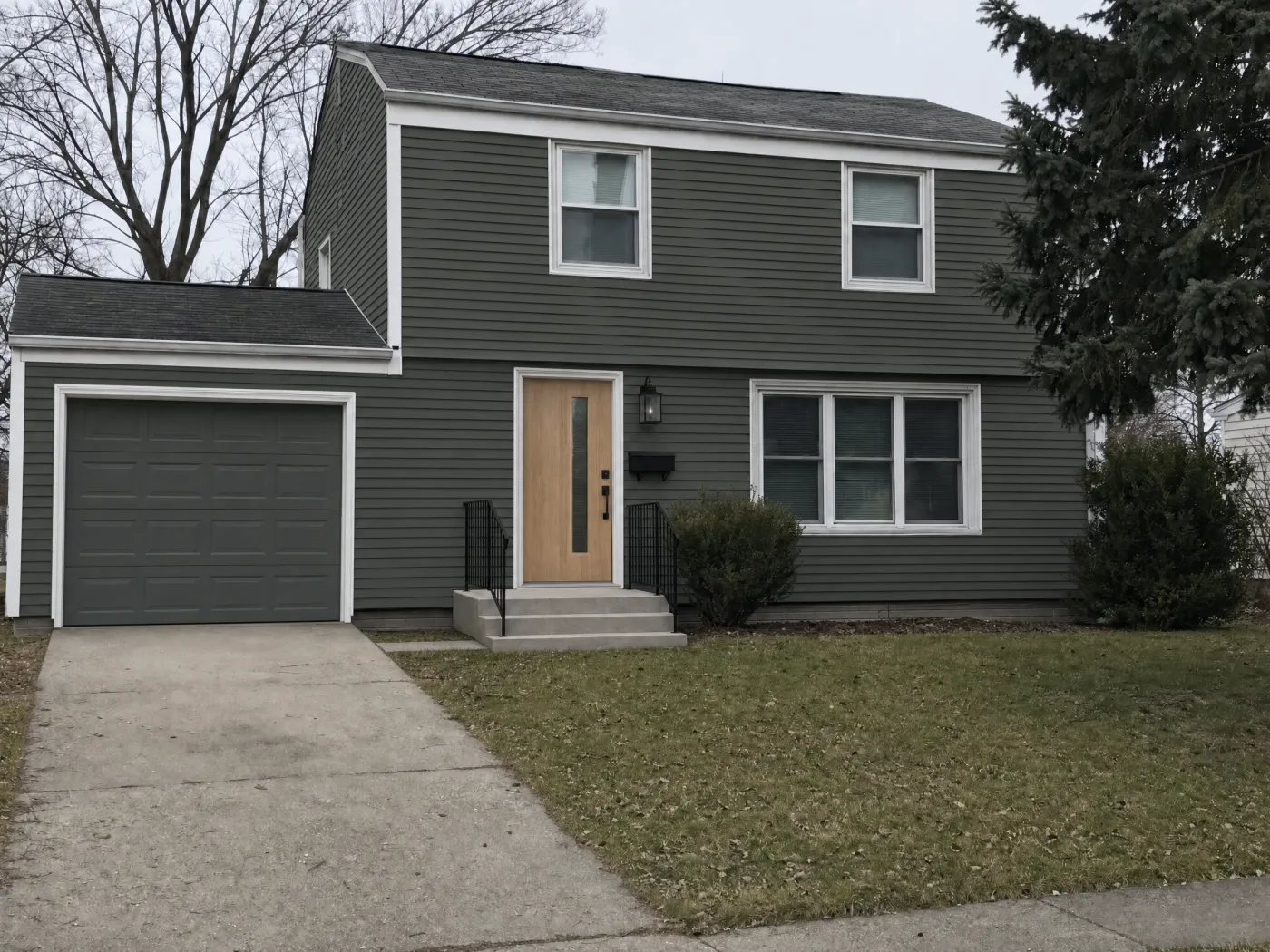
1Deep sage siding
3Garage to match
2Oak door, black lantern
4New steps, black rail
Spot Edit
Repaint the siding. Keep everything else.
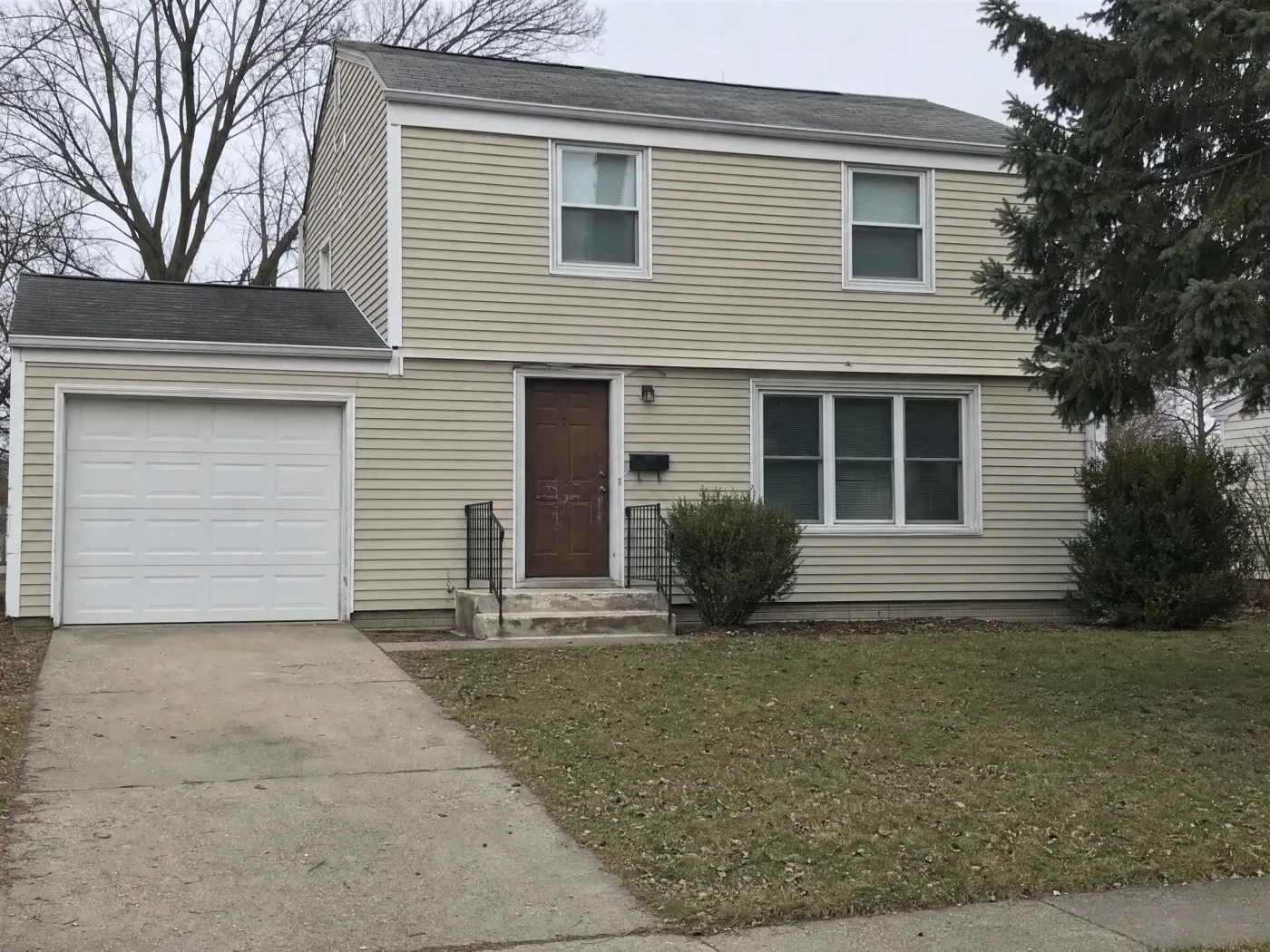
Choosing an exterior color is a comparison problem, and you cannot compare colors if everything else in the picture changes too. So Idori lets you pin exactly what you are painting. Pin up to four spots, the siding, the front door, the garage door, the steps, tell Idori what each should become, and only those spots change. The roof, the white window trim, the spruce, the leaves on the lawn: untouched, pixel for pixel. Attach a photo of the real paint chip, the exact door you are pricing, or the lantern in your cart, and call a spot out as @2 right in your prompt. Drag the slider further down this page: that faded beige house became deep sage with an oak door, and nothing you did not pin moved.
Only the pinned spots change: the roof, windows, and trees stay put
Attach a photo of the real paint chip, front door, siding, or light fixture
Body, trim, door, and garage as four separate colors in one generation
Styles
30+ styles. One house. Pick the one that is still you.
A style on the outside of a house is a set of decisions you would otherwise make one at a time: the body color, the trim, the material on the gable, the shape of the porch posts, the light by the door. Every one of Idori's 30+ curated styles applies to your facade in one tap. Modern Farmhouse is the one above: limewashed brick, black board-and-batten, cedar posts. Coastal goes to shingle, white trim, and soft blue. Mediterranean brings stucco, terracotta, and arched shadows. Japandi and Organic Modern pull everything back to wood, plaster, and a few honest lines. Rustic, Cottagecore, Industrial, and Mid-Century Modern each take the same roofline somewhere you would not have thought to go. Tap five, and you have five houses on your street to choose between, every one of them still yours: same roof, same windows, same front walk.
Four families, Modern, Classic, Bold, and Cozy, 30+ styles and growing
Applied to your real roofline, windows, and porch, never a stock house
Try a style, then Spot Edit the one color you would change
BeforeAfter
Compare, Branch & Version History
Ten colors on your house before one sample quart.
Exterior paint is decided in the worst possible way: a two-inch chip held up to a thirty-foot wall, then a week of second-guessing. Idori turns it into a side-by-side. Each house is a project in one continuous Workspace, and every color you try is a version you can return to. Compare slides any two versions across the same photo, sage against charcoal, white trim against black, so you judge the color and nothing else. Branch a paint-only version from the full makeover to see what this year's budget buys, and keep the porch and the new door for next spring. Version History keeps the whole path, so the color your partner liked in April is still there when the painter shows up in June.
Compare any two colors or styles on the same photo of your house
Branch a paint-only phase from the full exterior makeover
Export any version in full quality for the painter, the contractor, or the HOA
A repaint, a new material, and a new front entry are three very different budgets. Design all three on the same photo, then decide what this year is for.
Exterior paint colors
The cheapest big change a house can get. Test the body color, the trim, and the accent door as separate decisions, and see them together on your real siding before you buy a sample.
Body, trim, and accent colors, one at a time or together
Painted or limewashed brick before you commit
Shutters: repaint, replace, or remove
Siding, brick, stone, and roof
When the material itself is the problem. See board-and-batten on the gable, cedar shingle, stucco, stone at the base, or a standing-seam metal roof on the shape of house you actually own.
Vinyl, fiber cement, wood, and board-and-batten siding
Stone and brick accents, stucco, limewash
Roof color and metal roofs
Front door, porch, and curb appeal
The entry is where people look first. A new front door, a porch with real posts, lanterns, house numbers, and a garage door that stops dominating the facade.
Front doors, garage doors, and hardware
Porches, posts, railings, steps, and overhangs
Wall lanterns, window trim, and black windows
Freeform Prompt: examples of how people brief Idori
With a Freeform Prompt you describe your house in your own words and your own language, and Idori reads the intent. The best briefs say what stays, what changes, and how far you want to go. These are examples, not scripts: the decisions are yours.
“Keep the roof, the windows, and the white trim. Paint the siding a deep sage green, the garage door the same color, and give me a natural oak front door with black hardware.”
“Limewash the red brick to a soft white, paint the trim and gable black, remove the shutters, and replace the metal porch posts with chunky cedar ones.”
“Show this house in three colors: warm white with black windows, charcoal with cedar accents, and a muted navy with white trim.”
“Our garage door is the biggest thing on the facade. Make it disappear: same color as the siding, wood-look panels, and a lantern on each side.”
An AI exterior design is a visual concept, not a paint spec or a building plan. Idori shows how a direction will look on your house. Screens and daylight shift how a color reads, so paint large sample boards from the real brand and check them morning and evening before you commit. Painting or limewashing brick is hard to undo, and new siding, porches, roofs, and windows can need permits; many neighborhoods also have HOA or historic-district rules on exterior colors. Get the approvals, then get the quotes. Designing first means every quote you ask for is for the house you actually want.
Exterior design with AI, answered
Questions before you pick up a brush.
Yes. Idori is an AI exterior home design app for iPhone and iPad. It starts from a photo of your actual house and redesigns that exact facade: paint colors, siding, brick, trim, the front door, the garage door, the porch, lighting, and the roof, while the shape of the house, the windows, and anything you name stay where they are.
Cross the street and take one photo of the whole front of the house, roof to lawn, in soft daylight. Open it in Idori and either tap a style, describe the color in your own words, for example deep sage green siding, white trim, natural oak front door, or use Spot Edit to pin the siding, the trim, and the door separately. Idori returns your own house in the new colors in seconds, as a version you can Compare against the original and against every other color you try.
Yes. Get AI Ideas and Idori reads your house, the roof color, the brick or stone you are keeping, the light, the street, and proposes five directions with the reasoning behind each, such as a dark body color so the garage door recedes, or a warm white that works with the existing roof. Then try your own shortlist side by side with Compare. The decision stays yours; the AI makes the options visible on your house.
Idori is free to download and free to start. The Free plan includes Freeform Prompt redesigns and all 30+ curated styles on a weekly credit allowance, with Compare and Version History. Idori Pro opens up AI Ideas, Spot Edit, and watermark-free exports.
Yes. In Idori you can recolor the siding, the trim, the shutters, the front door, and the garage door from one photo of your house. With Spot Edit, only the parts you pin change, so the roof, the windows, the lawn, and the trees stay exactly as they are in your photo, which makes the color the only thing you are judging.
Yes. Idori redesigns materials as well as colors: limewashed or painted brick, board-and-batten or cedar siding, stone accents, a standing-seam metal roof, a new porch with timber posts, new windows, lighting, and a front door. Name what stays, and Idori keeps it.
Close enough to choose a direction, not close enough to skip the sample. Screens, daylight, and the direction your house faces all shift how a color reads. Use Idori to narrow ten colors to two, then paint large sample boards from the real paint brand and look at them on the house in morning and evening light before you commit.