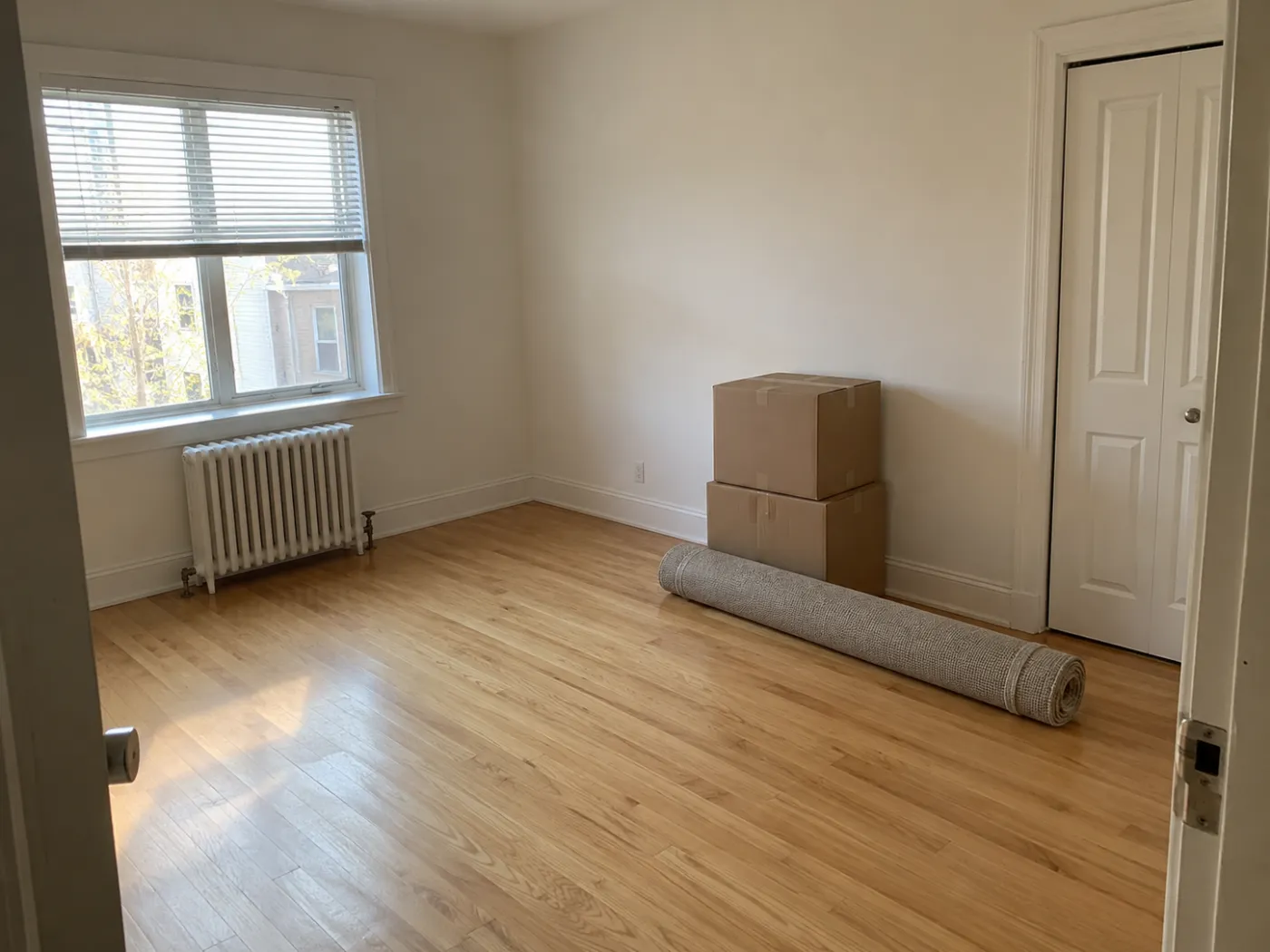
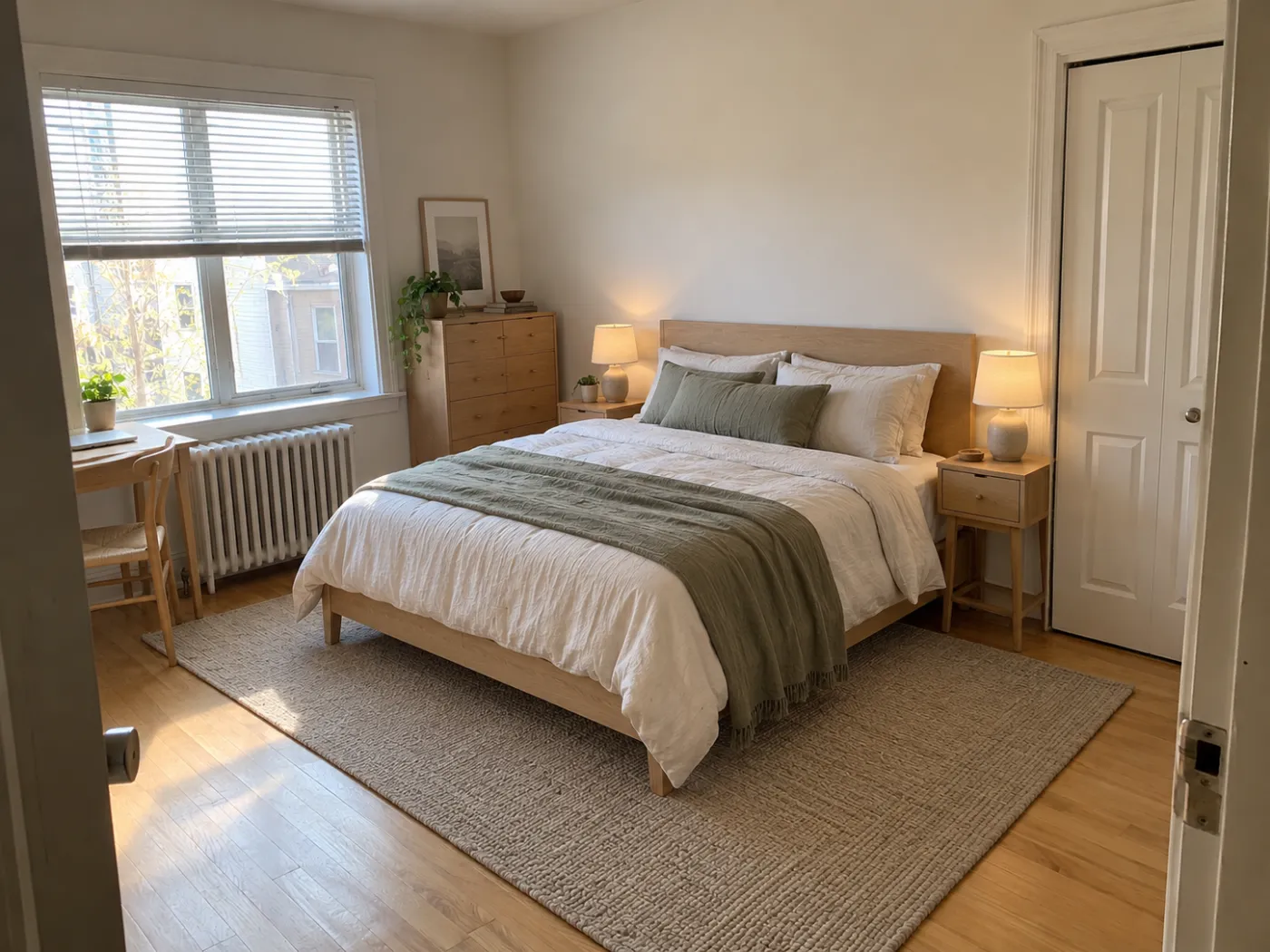
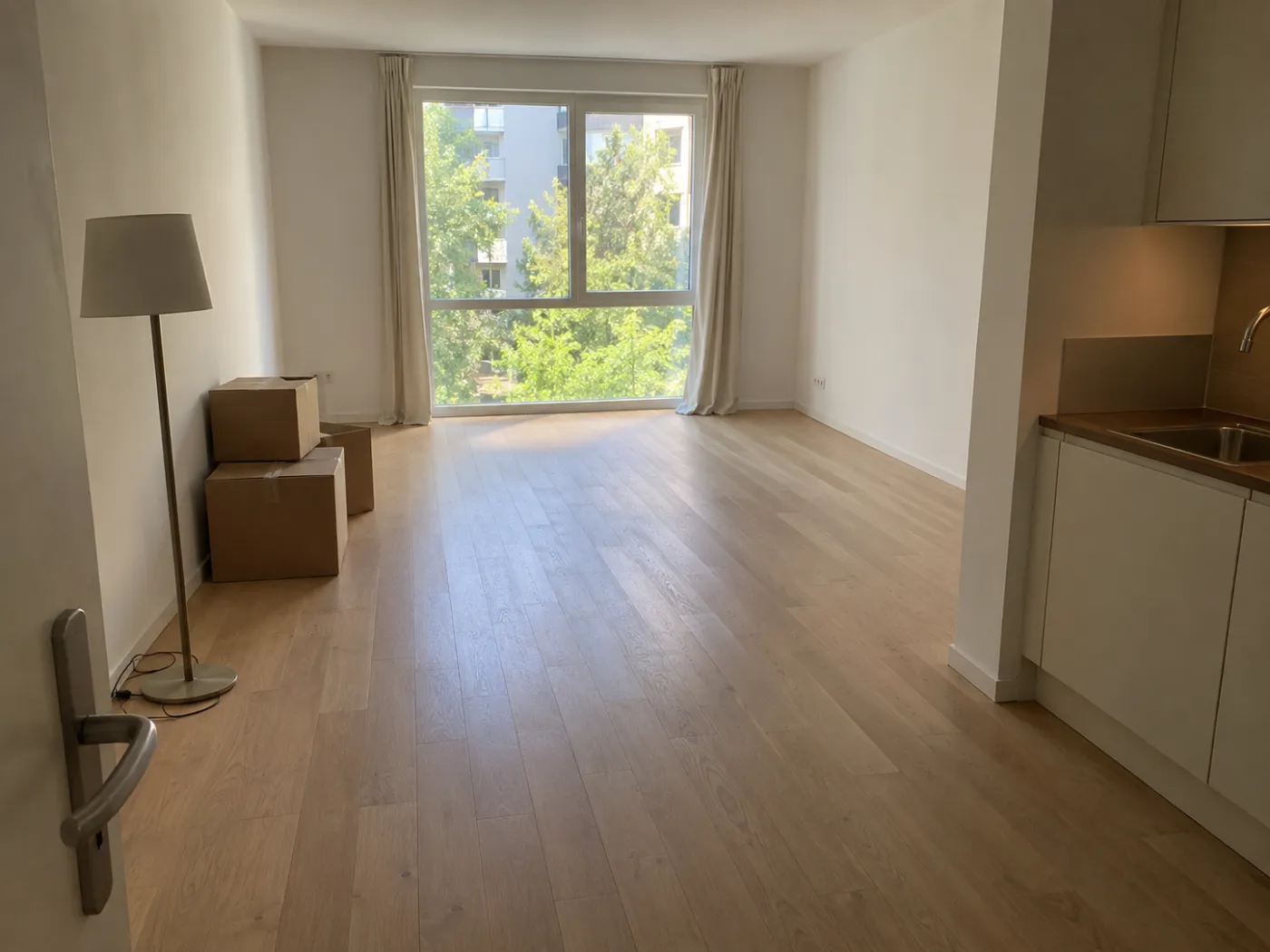
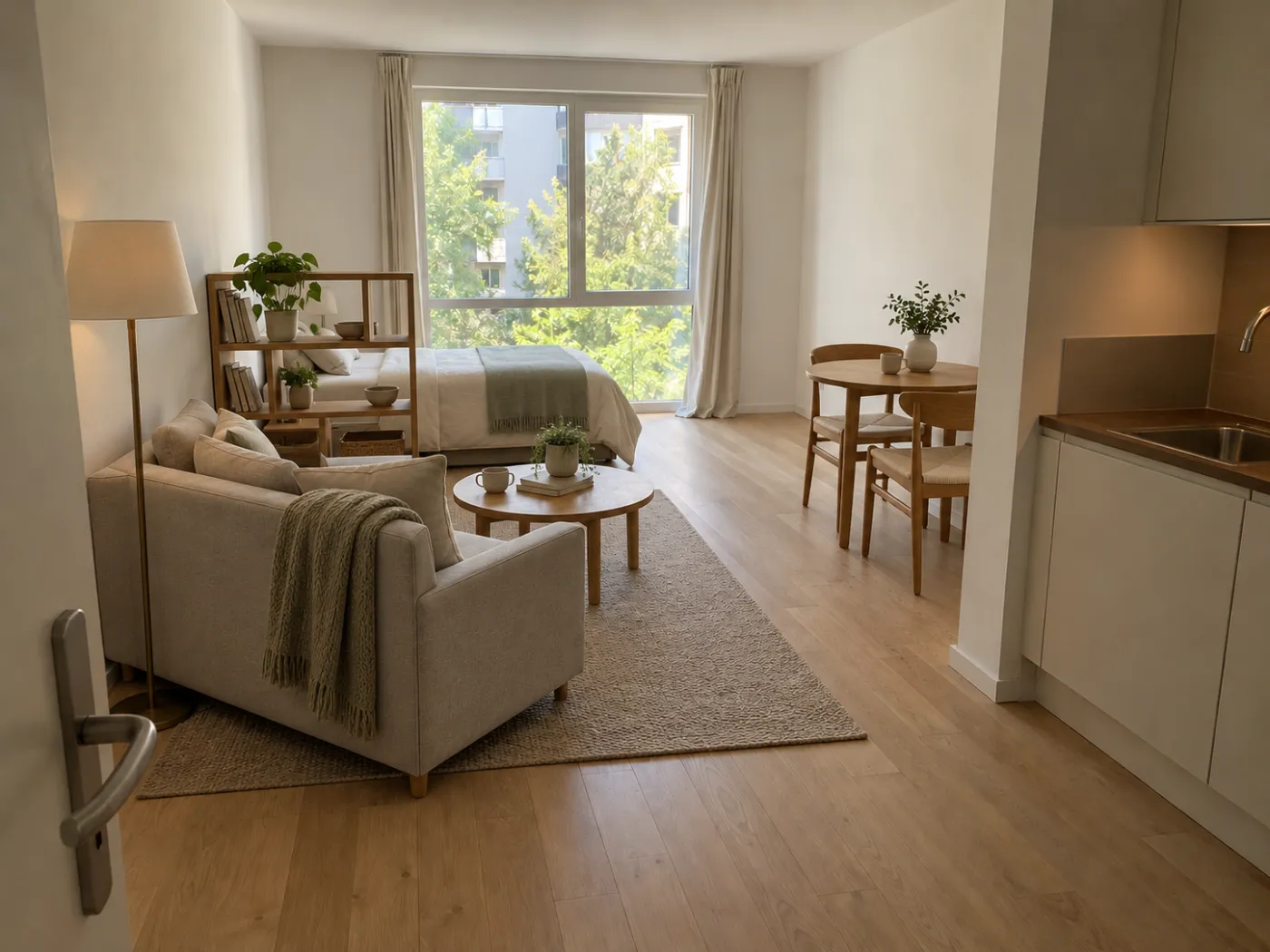
Idori plans your room on a photo of the real thing. Take one, get AI Ideas or say where the bed, desk, and sofa should go, and see the layout in seconds, before you buy a piece or carry anything in.
Free to start · No floor plan to draw · Your photos stay private
BeforeAfter
The flow
Plan the room on your phone. Set it up once.
No graph paper, no 3D model to build, no guessing from a showroom. Just the room you have and a photo of it.
1
Photograph the room
Empty on moving day, half unpacked, or already full of furniture. Snap it as it is, from the doorway.
2
Get AI Ideas or describe the plan
Get AI Ideas for where everything could go. Already have a plan? Describe it in any language: bed on the long wall, desk under the window.
3
See the layout in your room
Idori returns your own room with the plan in place: your walls, your window, your light, the pieces where you said.
4
Compare plans, then commit
Line up plan A against plan B, Branch the one that works to refine it, then buy and place the furniture once.
Everything Idori does, for planning
A room planning app that shows the plan in your actual room.
AI Ideas, Spot Edit, 30+ styles, Freeform Prompt, and a Workspace that keeps every plan. Decide where things go while changing your mind still costs nothing.
5 plans, read from your room
Anchor the room on the windowFace the main seating toward the light and keep the window wall clear, so the room has a focal point from the first day.
Plan the path firstLay the walkway from the door before placing a single piece, then build the seating around it instead of across it.
Zone it with the rugUse one large rug to mark the living area, with every seat's front legs on it, so the room reads as planned, not filled.
+ 2 more plans, each with its reasoning
AI Ideas
No idea where anything goes? Get five plans with the reasons attached.
A new room is a blank page, and a blank page is where most layouts go wrong: the bed lands on the first wall the movers reach, the sofa goes wherever the box was opened, and the plan becomes whatever happened. AI Ideas reads the room in your photo first, the window, the door, the radiator, the longest uninterrupted wall, and proposes five layouts with the thinking behind each: which wall anchors the room, where the path from the door should run, which corner wants the desk. Tap one to see it in your own room. The plan is yours to choose, and to change.
Five room plans read from your own walls, windows, and doors
Each plan explains why it works, so you learn what makes a layout good
Trained on real work from professional interior designers
1Place the new desk @1
2Bed on the back wall
3Keep the closet free
Spot Edit
Plan one piece at a time, including the ones you have not bought yet.
Planning a room is a string of small decisions: this desk or that one, this wall or the other. Spot Edit makes them one at a time. Pin up to four spots on your photo and give each its own instruction, the bed onto the long wall, the dresser into the corner, the desk under the window. Attach a photo of the exact desk or sofa you are about to order and call it out as @1, and Idori places that piece in your room before you pay for it. Everything you did not pin stays exactly where it is, so every settled decision stays settled.
Place a piece you are about to buy by attaching its product photo
Up to 4 precise spots per generation, each with its own instruction
Only the pinned spots change; the rest of your plan holds
Styles
Plan the layout and the look in the same project.
Where things go and what they look like are one decision pretending to be two. A low Japandi bed opens a small bedroom in a way a tall sleigh bed never will; a Mid-Century sofa on slim legs makes a tight living room feel planned instead of packed. Any of Idori's 30+ curated styles applies to your planned room in one tap, keeping the layout and restyling the palette, textiles, lighting, and the character of every piece. Scandinavian and Minimalist for calm, Industrial and Art Deco for edge, Coastal and Cottagecore for the room you want to come home to.
Four families, Modern, Classic, Bold, and Cozy, 30+ styles and growing
The layout you planned stays put while the style changes
Shop for furniture knowing the style and the spot it has to fit
BeforeAfter
Compare, Branch & Version History
Plan A, plan B, plan C. Decide with your eyes, not your memory.
Every room plan is a choice between options you cannot see at the same time. Bed under the window or on the long wall? Desk facing the wall or facing the room? Idori keeps every plan as a version in the room's project, in one continuous Workspace. Compare slides between any two on the same photo. Branch from the plan you like to try one more idea without losing it, and Version History keeps the whole path, so the plan you set aside on Monday is still there when you realize on Thursday that it was the right one. Then you buy once and set up once.
Slide between any two plans of your own room
Branch a plan to explore a variation without losing the rest
Export any version in full quality to share before you buy
A room planning app is most useful when the brief names what the room is for, what has to fit, and what cannot be blocked. Start with one of these, then make it yours.
Bedroom
Decide the bed wall first; everything else follows it. Compare the longest uninterrupted wall, the wall facing the window, and the wall away from the door, then fit the dresser, desk, and nightstands around the winner.
A clear path on at least one side of the bed
Room for drawers and closet doors to open
A desk where the daylight falls across it
Living room
Pick one focal point, the window, the fireplace, or the TV wall, and plan the seating to face it. Mark the walkway from the door before you place the sofa, not after.
One rug large enough to hold the seating
A coffee table within reach of every seat
Windows and radiators left unblocked
Studio or small apartment
Plan zones, not rooms: a place to sleep, a place to work, a place to sit. A rug, an open shelf, or the back of a sofa separates them without adding a wall or stealing light.
One continuous walkway through every zone
Furniture on the perimeter before the center
Low, light pieces where the room is tightest
Plan your bedroom layout before the bed frame arrives
The bed is the biggest decision in a bedroom and the hardest one to undo once it is assembled. Plan its wall, then the pieces around it, in a few Freeform Prompt briefs, in your own words and your own language. These are examples, not scripts: the decisions are yours.
“Plan this empty bedroom with a queen bed on the long wall, a nightstand on each side, and a small desk under the window.”
“Show the bed facing the window instead, and keep a clear path from the door to the closet.”
“Plan this small bedroom for two kids: two single beds, one shared dresser, and open floor space to play.”
“Fit a reading chair and a floor lamp into the corner without blocking the radiator.”
Planning a new place? Brief the whole room at once
Moving in is the one moment every room is a blank page. Describe how you want to live in it, and let Idori show you what that looks like before the boxes are open.
“Furnish this empty living room for two people who work from home: a sofa facing the window, a desk corner, and lots of storage.”
“Plan this studio with separate sleeping and living zones, using a bookshelf as a divider and keeping the window clear.”
“Show where my existing grey sofa and oak dining table fit best in this new room.”
“Plan this room as a guest bedroom that also works as a home office.”
Plan the look and the placement here, then measure. Idori shows a visual plan on your photo, not a dimensioned floor plan or a CAD drawing. Before you order or carry anything in, check furniture sizes, walking clearances, door swings, outlets, and vents in the real room. Our guide to planning a room layout lists the clearances designers use, in inches, and floor plan apps vs AI room design explains which tool does which job.
Planning your room, answered
Questions before you start.
Yes, Idori is an app to plan your room from a photo. Photograph the room, empty or already furnished, get AI Ideas or describe where things should go, and see the layout in your actual room on your iPhone or iPad. Compare plans side by side before you buy or move anything.
For planning a layout on the room you actually have, Idori. Floor plan apps ask you to draw walls and drag boxes; Idori starts from a photo, so every plan shows your real window, door, and light. AI Ideas proposes layouts with the reasoning behind them, Spot Edit places one piece at a time, including furniture you have not bought yet, and Compare lines plans up side by side. If you also need dimensioned drawings, use a floor plan app for the measurements and Idori to see how the room will look and feel; floor plan apps vs AI room design covers the split.
Yes. Photograph the bedroom and ask Idori to try the bed on different walls, then fit the nightstands, dresser, and desk around the one that works. Spot Edit moves one piece without touching the rest, and Compare shows two bedroom plans side by side, so you pick the bed wall before you assemble the frame.
Yes. Photograph the empty room at a viewing or on moving day and describe what you want to fit: a sofa facing the window, a desk corner, a bed on the long wall. Idori furnishes the photo with that plan, so you can decide what to buy and where it goes before the truck arrives.
Yes. Tell Idori which pieces to keep, like your grey sofa or your oak dining table, and it plans the room around them. With Spot Edit you can attach a photo of a specific piece and call it out as @1 to place that exact item where you want it.
Yes, Idori is free to start. The Free plan includes Freeform Prompt redesigns, the full library of 30+ curated styles, and full Compare and Version History, on a weekly credit allowance. Pro unlocks AI Ideas, precise Spot Edit, and watermark-free exports.
No. Idori plans the room visually, on a photo, so you see how the layout will look and feel in your real space. It does not draw dimensioned floor plans or blueprints. For exact measurements, pair it with a tape measure or a floor plan tool, and use Idori to decide what the room should be.
Not to start. One photo is enough to explore plans. Because the result is a visual concept rather than a measured drawing, confirm furniture sizes, walking clearances, and door swings before you order or move anything.